The Pocket Model guide
pocket model builds small models from your data. You bring rows: inputs and the answers you want, with photos if the task has them. You check the data, compare models on it, grow it with a teacher, and train a small open model on it with LoRA. Then you get a model you can call or download.
You can do all of it in the app at app.pocketmodel.ai, or from a terminal or an AI agent with pm, its CLI and MCP server. Both work on the same experiments. Anything pm does shows in the app, and the other way round.
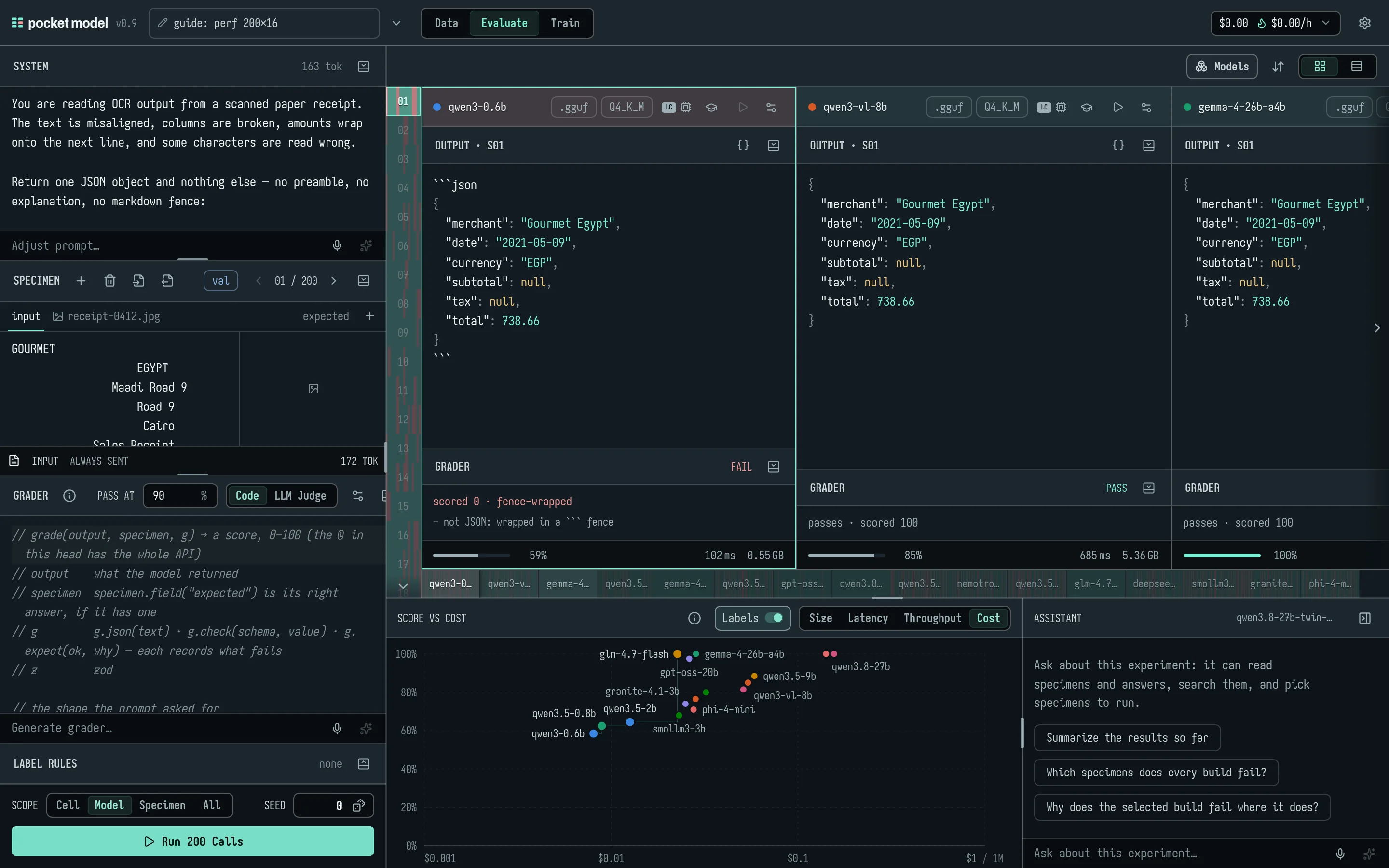
Contents
- Getting started
- Rows and splits
- Data quality first
- Evaluating
- Teachers and training data
- Training
- Cost
- pm and MCP, for agents
- The assistant, and watching an agent work
- GPUs
- Troubleshooting
- Reference: every MCP tool and pm command
1. Getting started
Sign in
Open app.pocketmodel.ai and choose Continue with Google or Continue with GitHub. Only accounts on the server's allowlist get in. Otherwise you'll see "your email isn't on the list for this app yet." A Google and a GitHub account with the same verified email are one user.
Everything you make is yours alone: your experiments, your provider keys, your queued calls and your trained models.
The words
- Experiment: one task. It holds rows, a system prompt, a grader, and the models you compare (builds).
- Row (the app also says specimen): one input, often with an expected answer, and optionally photos. Rows are named S01, S02… by position. Each also has a uid that never changes.
- Split: which part a row belongs to: validation, test, train, a held-out set, or unassigned.
- Build: a model in this experiment, set up a particular way: a GPU model on pocket model's fleet, a model from a provider (Anthropic, OpenAI, OpenRouter…), or a model you trained.
- Grader: JavaScript that scores each model answer from 0 to 100. A pass mark decides pass or fail.
- Label rules: JavaScript that checks your expected answers, not model answers. See section 3.
- Teacher: a strong model that writes new training rows, or answers inputs you already have.
- Student: the small open model you train.
Experiments
The experiment's name sits at the top left; click it to rename. The chevron beside it opens the experiment menu:
- Open… lists your experiments, newest first. You can delete any but the open one: a second click confirms, and Export it first to keep a copy reminds you that delete is final.
- New experiment, Duplicate, Import from a file… (a
.jsonexport) and Export to a file… (<name>.many-eval.json). New, Duplicate, Import and Open each open in a new browser tab.
A new experiment starts with one empty row, a neutral grader and the current experiment's builds. The neutral grader compares JSON with the expected answer key by key, and text by what it says.
Recipes
A new experiment can start from a recipe: one shape of job, with its prompt, a handful of example rows, a grader that measures what matters for that shape, label rules for the rows you bring, two pocket models and how to train one.
| Recipe | For | The grader measures | Trains with |
|---|---|---|---|
| Classify | One label from a fixed set: fraud screening, ticket and alert triage, transaction categories, medical codes | Right label or not, plus tp/fp/fn so the report gives F1. Set POSITIVE to the labels you must catch (["fraud"]): answering "legit" every time passes most rows and catches nothing, and F1 shows it |
SFT, keeping the checkpoint with the best F1 |
| Extract | Fields out of a document into JSON: receipts, invoices, claims intake, identity documents | The share of fields right on each row, and each field's share across rows | SFT, best score |
| Redact | The same text with personal data replaced by tags ([NAME], [EMAIL], [PHONE], [ADDRESS], [ID], [CARD]) |
F1 over the spans to hide: a span left in is a leak (a miss), an extra tag a false alarm. Passing means nothing leaked, nothing extra, the rest unchanged | SFT, best F1 |
| Reply | A written answer a reviewer would accept: support replies, summaries | A judge's 0–100 against your reference reply (a pocket model, thinking off: cheap), less 30 for a broken rule such as length | SFT, best score |
The example rows show the shape and run once. Bring your own in the columns the recipe names (input and expected, or an image field for documents), then edit the prompt and the grader's labels or fields to yours. Add a hosted model you'd otherwise pay for as the reference to beat.
From a terminal, pm recipes lists them and pm new <name> --recipe classify starts one. An agent uses recipes_list, then experiment_create with recipe. Training then defaults to the recipe's method and checkpoint choice; anything you pass to train_start wins.
Each experiment has its own address: /e/<id> for Evaluate, /e/<id>/data and /e/<id>/train. Back and Forward step through the stages. Changes save as you go, 400 ms after you stop typing.
If you edit an experiment in two places at once (two tabs, or the app and pm), the later save sees the earlier one and takes it rather than overwriting it.
The three stages
The bar at the top has three stages:
| Stage | What you do there |
|---|---|
| Data | Import rows, split them, check their quality, write label rules, and grow the training set with a teacher. |
| Evaluate | Run builds over the rows, grade the answers, and compare score against cost, latency, throughput or size. |
| Train | Train a LoRA on the train rows, follow the run, evaluate it beside the others, and download it. |
The bar also holds:
- the run status (a spinner, then a check or a red alert you click to open each failed call);
- the agent badge, when an agent is driving (section 9);
- the spend meter (section 7);
- the Settings gear;
- your account menu, with Model library, Docs, Settings and Sign out. Settings has a Docs link in its head too.
Every stage has the Assistant panel at the bottom right (section 9).
On a phone, each stage becomes tabs: Evaluate has Setup, Results, Chart and Assistant; Data has Setup, Rows, Row and Assistant; Train has Recipe, Runs, Run and Assistant.
Settings
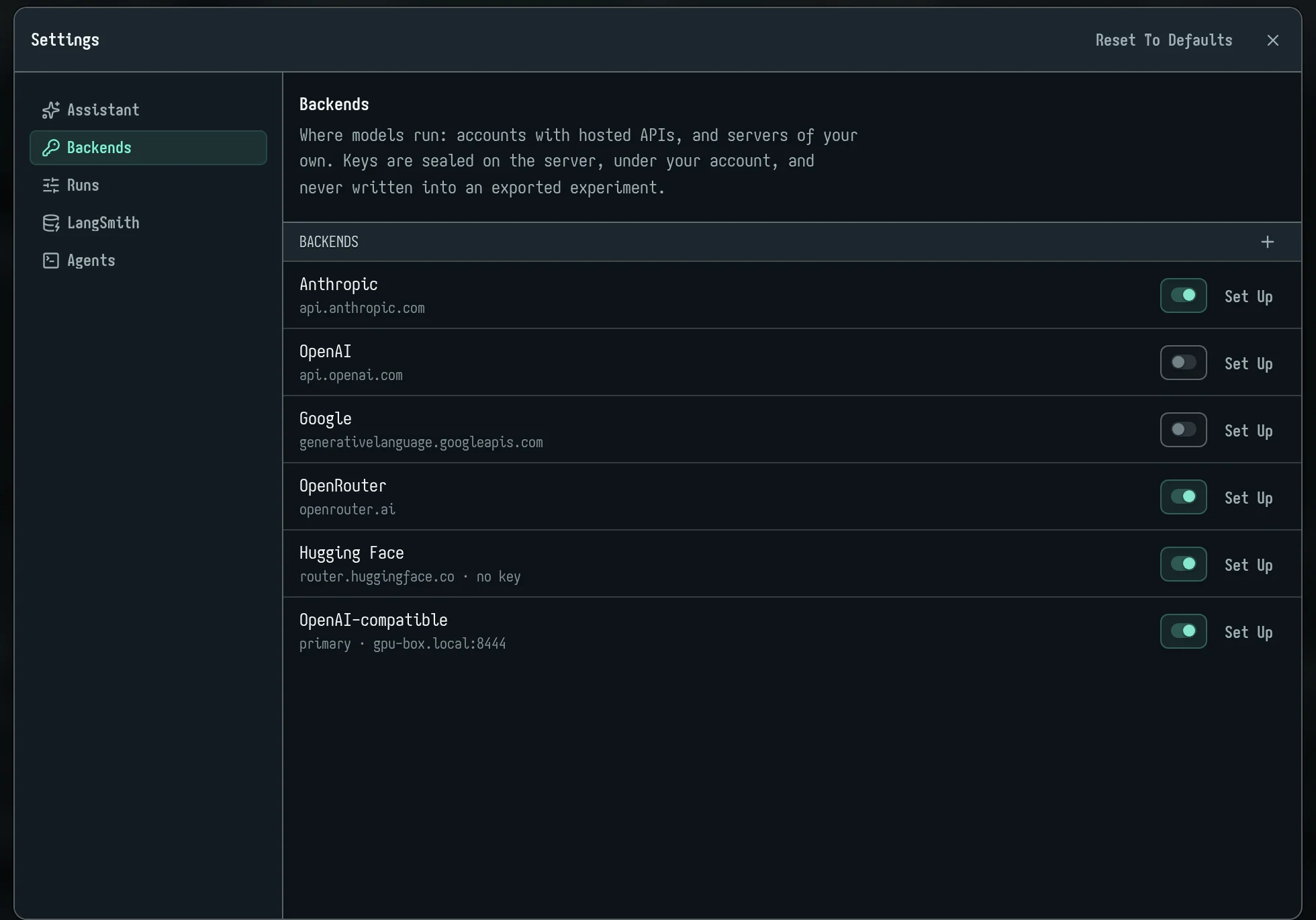
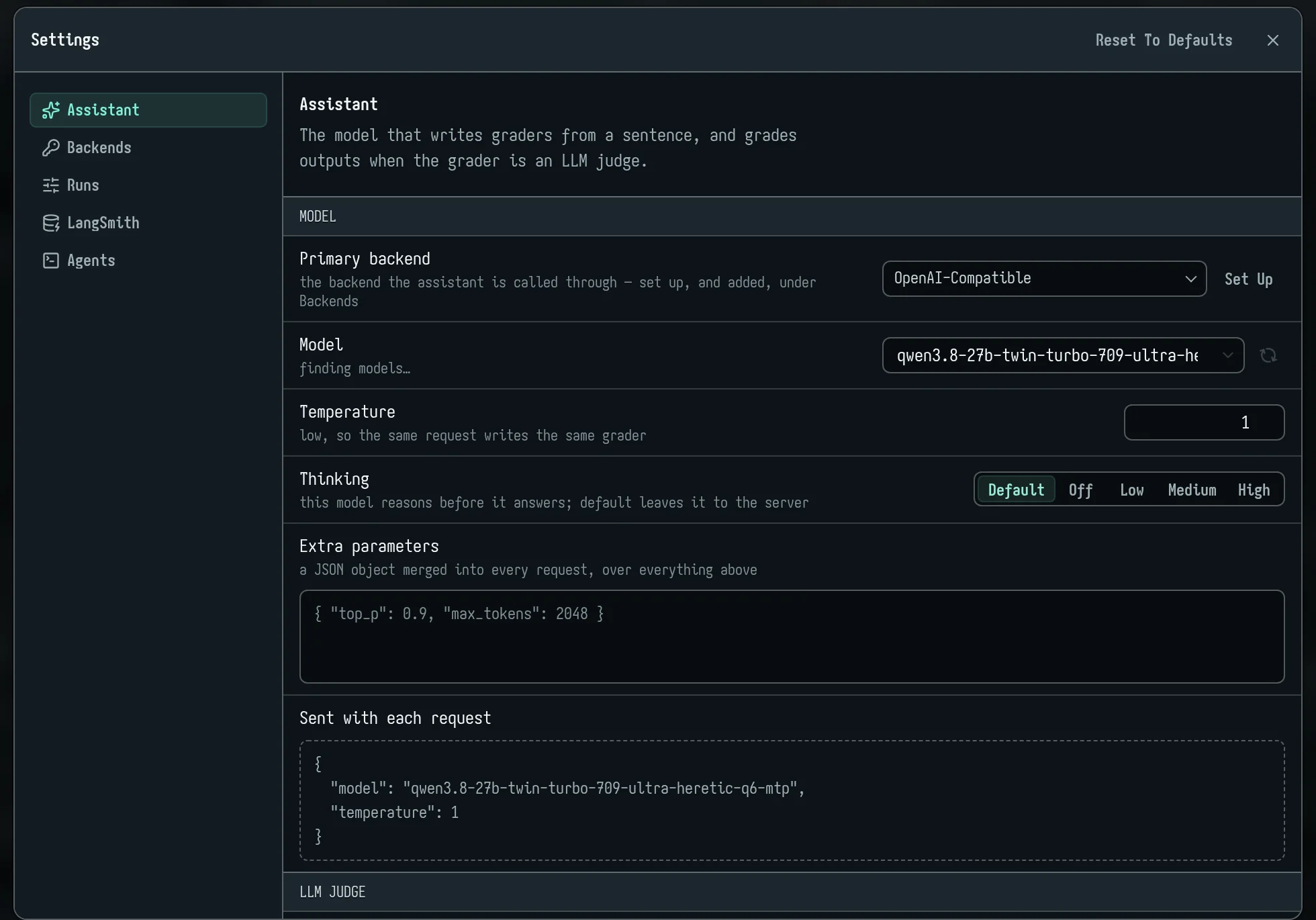
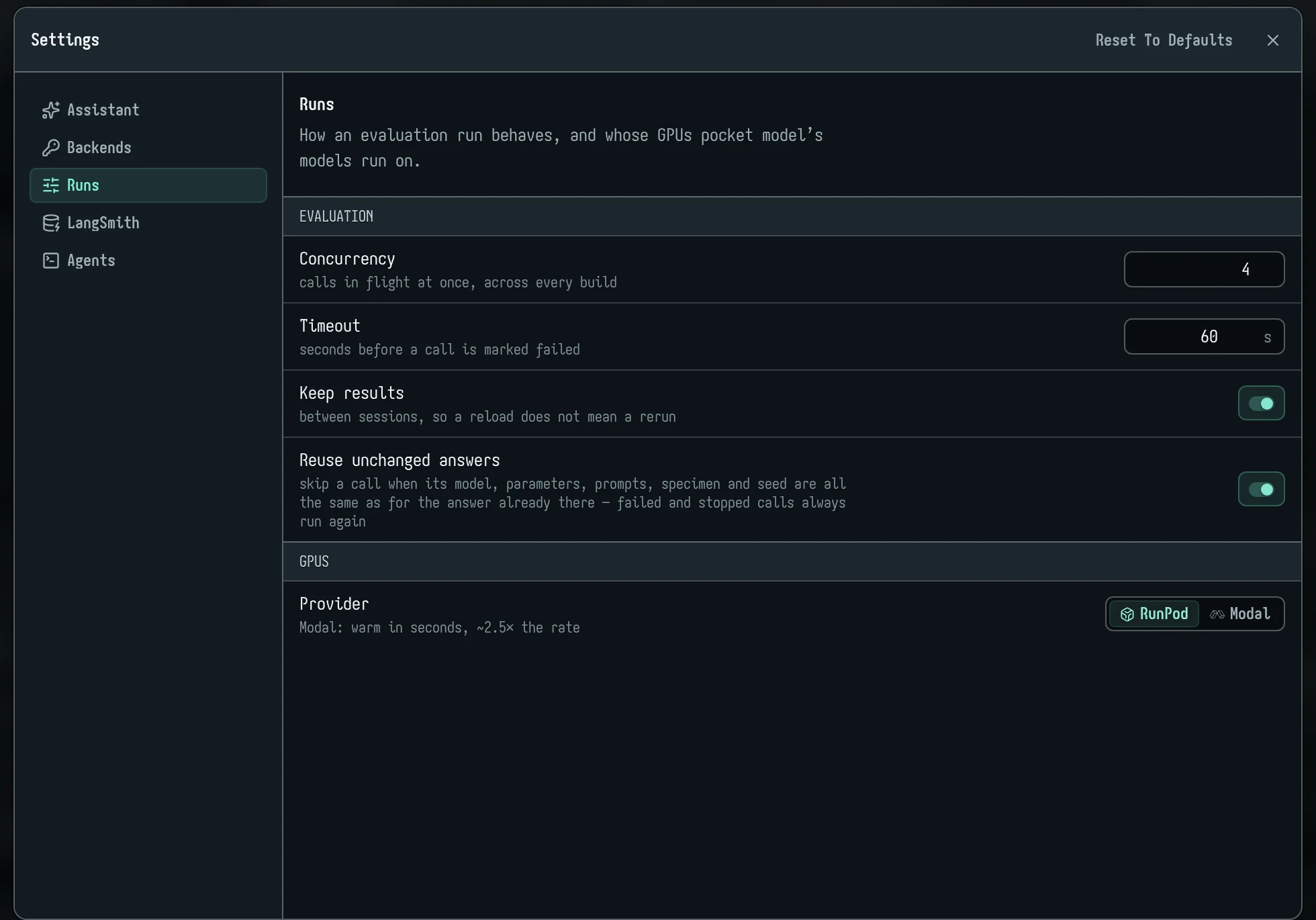
Settings has five tabs:
- Assistant:
- Model group: the model behind the assistant panel, the smart filter and the "Generate…" boxes. You choose a Primary backend and a Model, and can set Temperature (not sent to Anthropic), Thinking (for reasoning models) and Extra parameters (JSON). A preview shows exactly what is Sent with each request.
- Backends: where models run. Out of the box: Anthropic, OpenAI, Google, OpenRouter, Hugging Face and an OpenAI-compatible server of your own. Each has an on/off switch and Set up.
- A key you paste is sealed on the server under your account and dropped from the page; afterwards the field shows
saved · ••••abcdwith Forget. Keys are never written into an exported experiment. +adds another account or an OpenAI-compatible server.
- A key you paste is sealed on the server under your account and dropped from the page; afterwards the field shows
- Runs:
- Evaluation: Concurrency (calls at once per backend, default 32, up to 128; a server of your own takes no more than the slots it reports), Timeout (seconds before a provider's answer is given up on; pocket model GPUs and teacher batches get 15 minutes, as they may be starting), Keep results, Reuse unchanged answers.
- LangSmith: connect with a region and API key to import traces and datasets as rows. Nothing is written back to LangSmith.
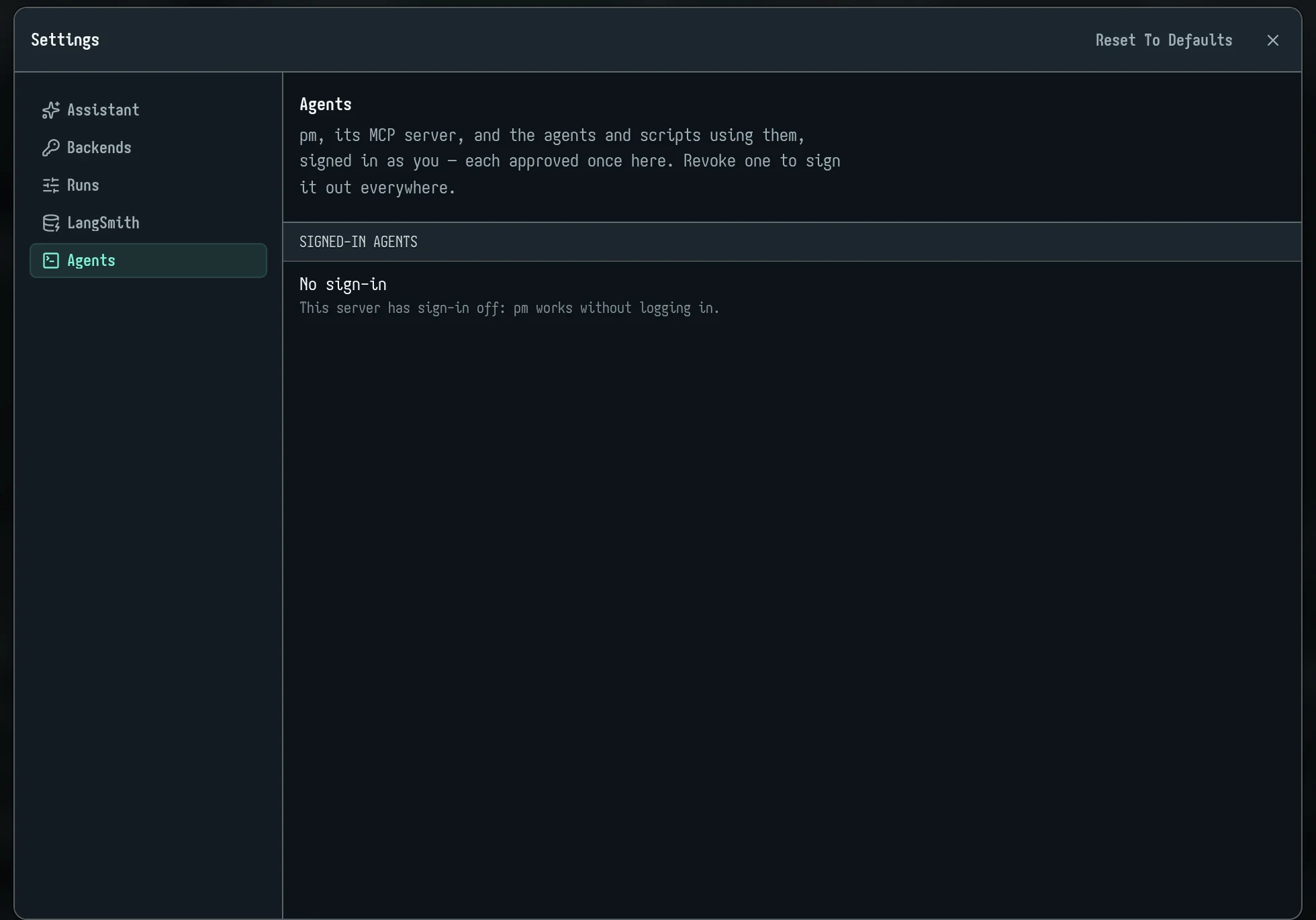
- Agents: the
pmsign-ins on your account, each with when it signed in, when it was last used, and Revoke.
2. Rows and splits
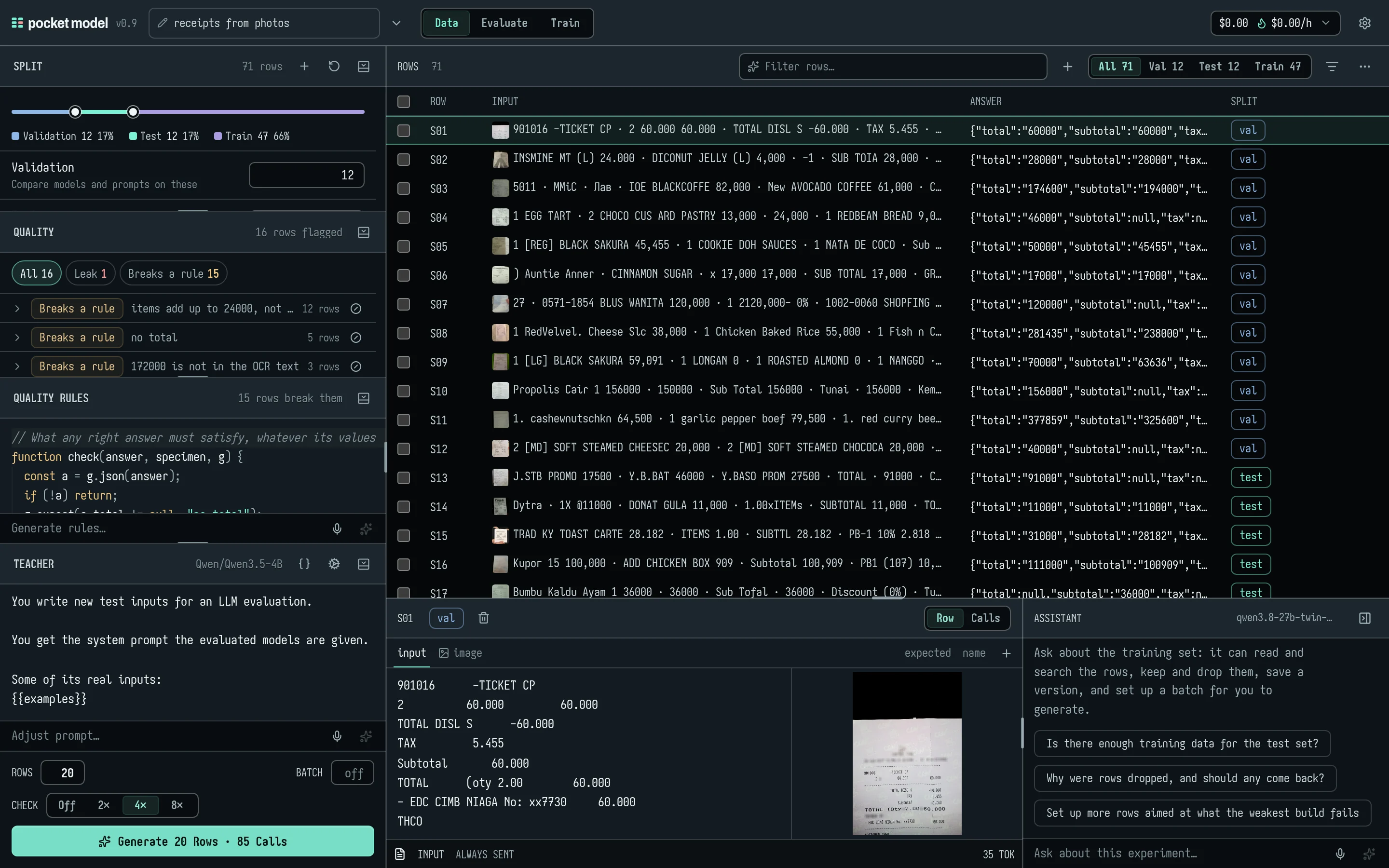
Import rows
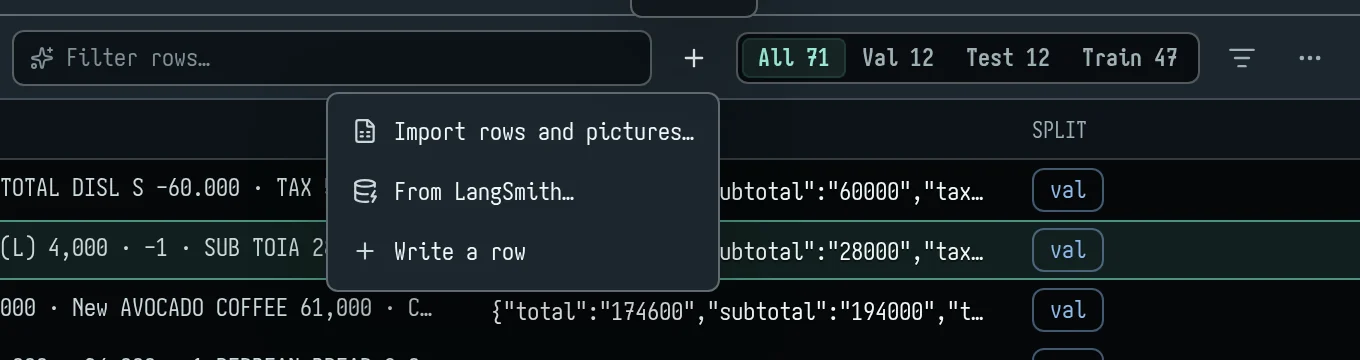
In Data, open Add rows (the + in the rows header):
- Import rows and pictures… opens the import dialog. Choose files, a folder or a zip, or drop them on the rows.
- From LangSmith… imports traces or dataset examples.
- Write a row adds an empty one.
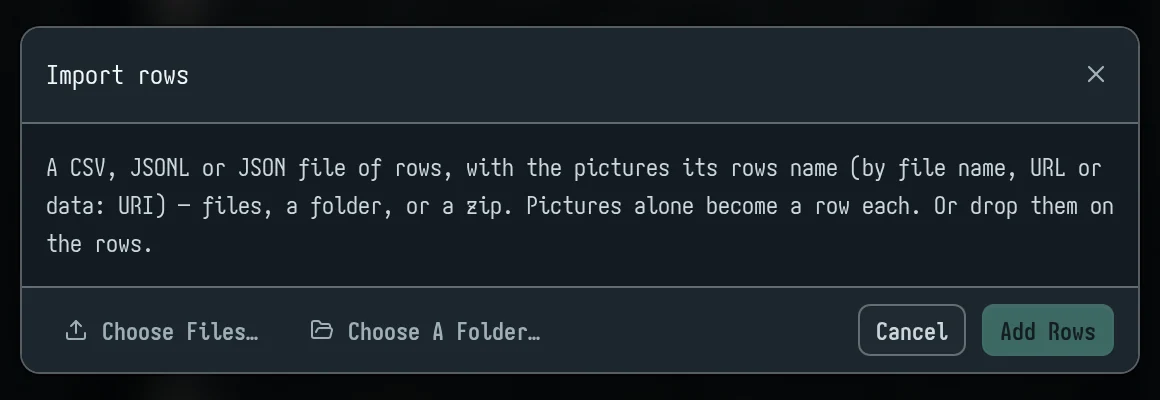
The import dialog takes a CSV, TSV, JSONL or JSON file of rows, plus the photos those rows name.
What a record can say:
| Field | Read from (first one present) |
|---|---|
| Input | input, text, prompt, question, query, else the last user message in messages |
| Expected answer | expected, output, answer, completion, target, label, response, else the last assistant message |
| Pictures | image, images, image_path, image_url, picture, photo (a string, a list, or {url} objects), and image_url parts of a message |
- A picture can be a file name beside the rows file, a path, an
http(s)URL or adata:URI. Names are matched by path, then by base name, ignoring case. - Every other plain value in a record becomes a field that is not sent to the model. A chat
systemmessage becomes a field called "system". - A non-string answer is stored as compact JSON.
- Pictures alone, with no rows file, become one row each.
- A picture over 64 MB is refused.
CSV and TSV: a .tsv file (or a first line with tabs and no commas) is split on tabs. A quote opens a quoted cell only at the cell's start, so JSON inside a cell reads as written. The first column's header must be input. Other columns become fields named by their headers; expected is the answer. A header ending (sent) makes that field go to the model.
CSV does not use the aliases above: a column named
answerbecomes a field called "answer", not the expected answer. A CSV whose first header isn'tinputis read as having no header at all.
Add or Replace: Add keeps your rows and puts the new ones after them; Replace swaps them out, answers and all.
From a terminal:
pm rows import receipts.jsonl --split train
pm rows import reads the same formats and uploads the pictures (paths are relative to the file). Leave out --split to import them unassigned, or give val, test or train. An agent uses rows_import with a path, or with content and format. Bytes already stored are not uploaded again ("reused").
From LangSmith:
- Take traces (by project, dates, step, tags, feedback or failures) or a dataset.
- Choose what becomes the input: the last message, the whole conversation, one input key, or all inputs as JSON.
- Choose what becomes the expected answer: none, a person's correction, the reference output, or what it answered.
- Take at most defaults to 100, up to 1,000. Repeats are skipped. Production model adds the traced model as a build.
- Pictures in LangSmith traces are not imported; they come through as the text "[image]".
Photos in rows
A row's photos sit beside its input: a thumbnail in the table, and a full picture in the open row. Click a picture for the lightbox. The wheel zooms about the pointer, a drag pans, a double-click zooms, and a click anywhere closes it.
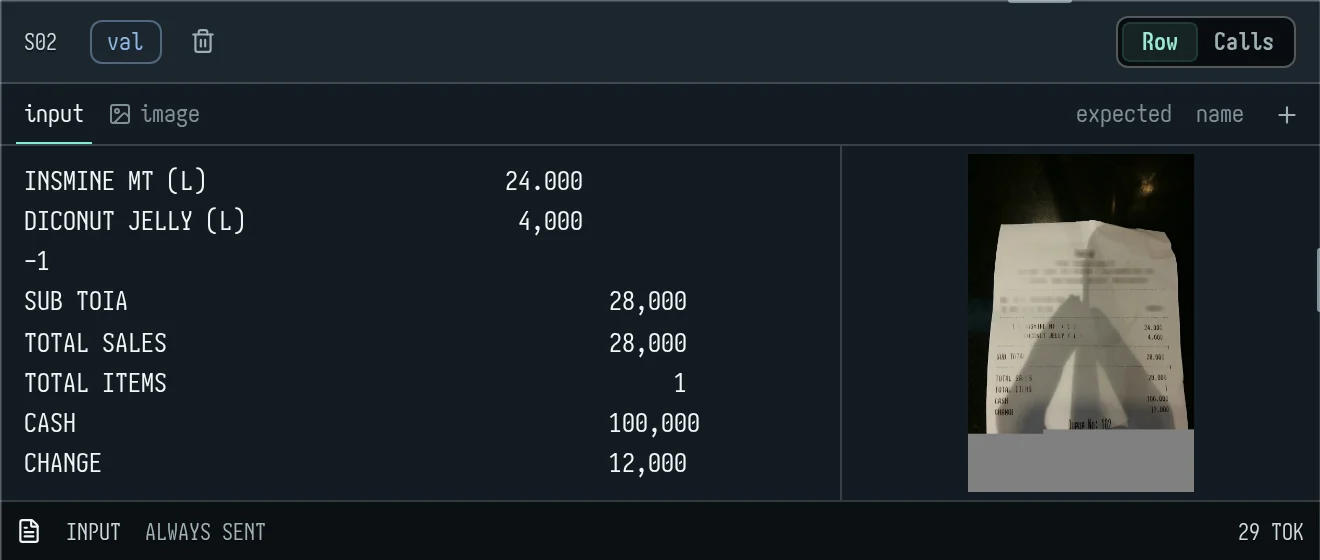
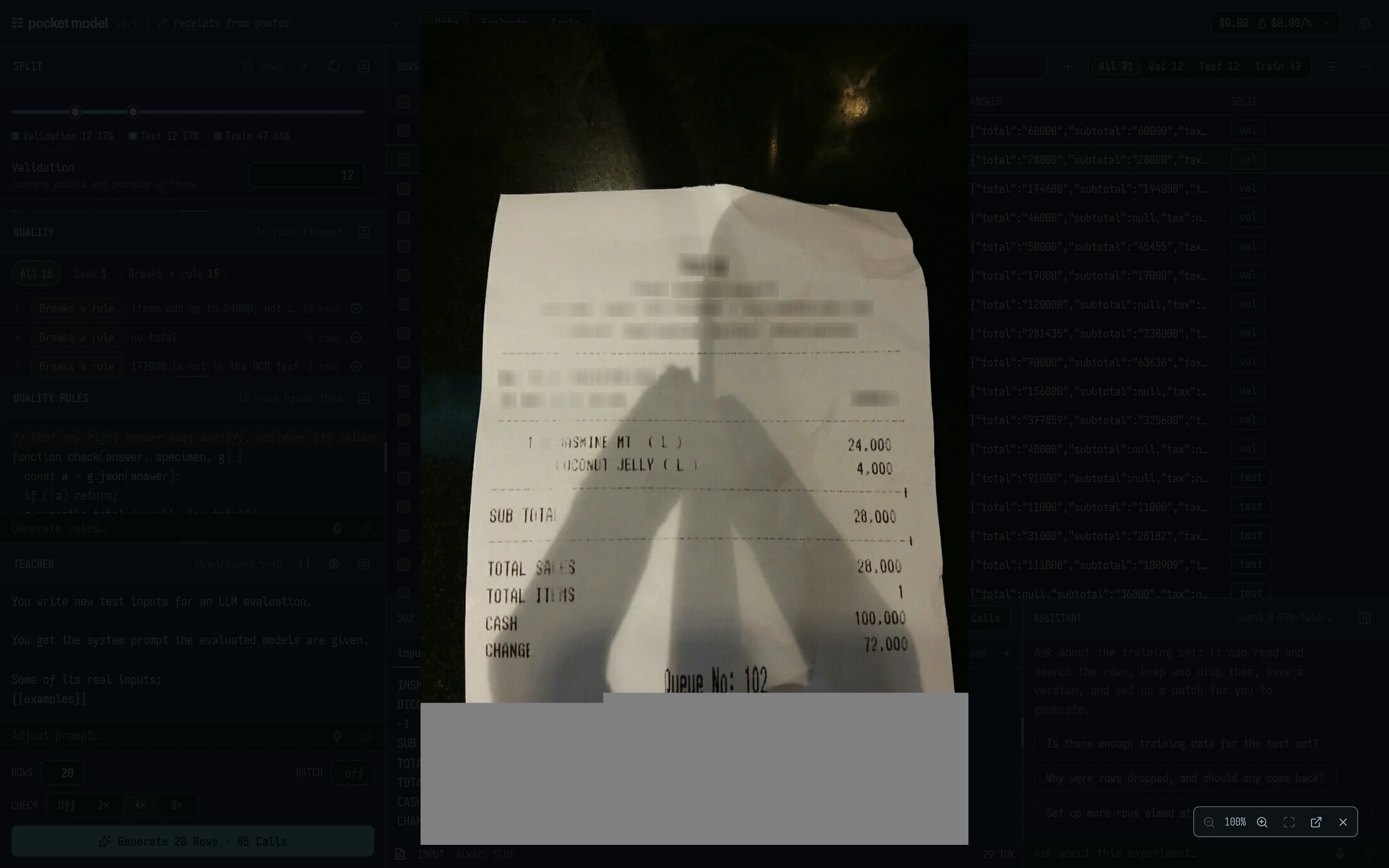
- Photos are sent to every build and teacher with the row, typed by their bytes.
- They go into the training files too, when the student can see (section 6).
models_listand the model library mark which models take pictures (vision).
Edit a row
Click a row to open it below the table.
- Tabs:
input, then fields sent to the model, then fields held back (such asexpected). +adds a Text field or an Upload….- Each field's bar: its name, Send with prompt,
{}(format the JSON, or put it on one line), its size in tokens, and remove. - Paste a picture into the input and it becomes an image field.
- Undo: Cmd/Ctrl-Z steps back through every value a field had, including ones the assistant, an agent or the
{}button set, not only what you typed. Shift-Cmd/Ctrl-Z or Ctrl-Y steps forward.
Find and select rows
- Split filter: All, Val, Test, each held-out set, Train, Unassigned.
- Source filter: All rows, Yours (imported or written), or Written by a teacher.
- Smart filter: type what you want in Filter rows…, for example "train rows whose total is over 100000". The assistant turns it into a checked query, and a chip shows the summary and how many rows match.
- The query can use
input,answer,split,source,state,failing,passing,failed_by,len(input),len(answer),field.<name>andanswer.<json.path>. - The smart filter needs the assistant set up in Settings.
- The query can use
- Selecting: Ctrl/⌘-click ticks a row; Shift-click ticks a range.
- With rows ticked: the header offers Move to a split, Delete and Clear.
- Right-click any row for Open, Accept (a teacher's row), Move to, Set aside, Let back in, and Delete. On a ticked row it acts on all ticked rows.
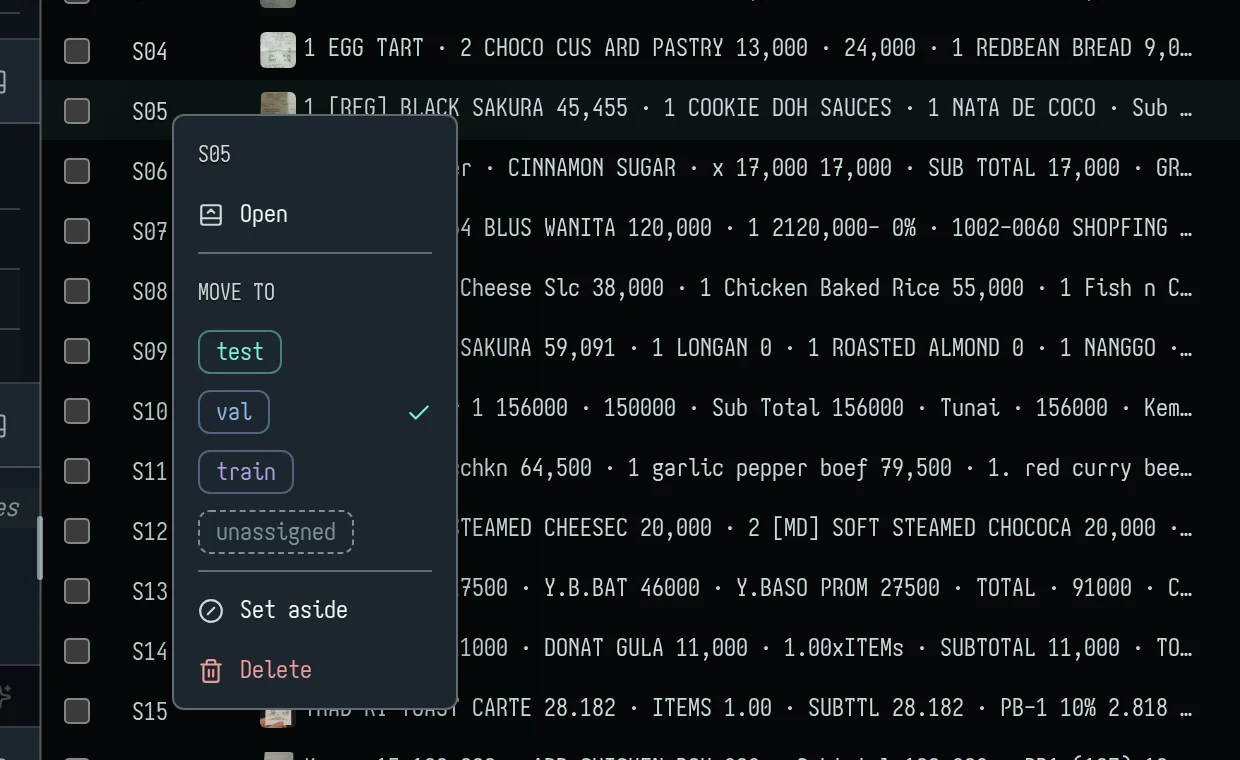
Deleting shows Deleted N rows · Undo for a few seconds; Undo brings the rows and their answers back if nothing else has changed.
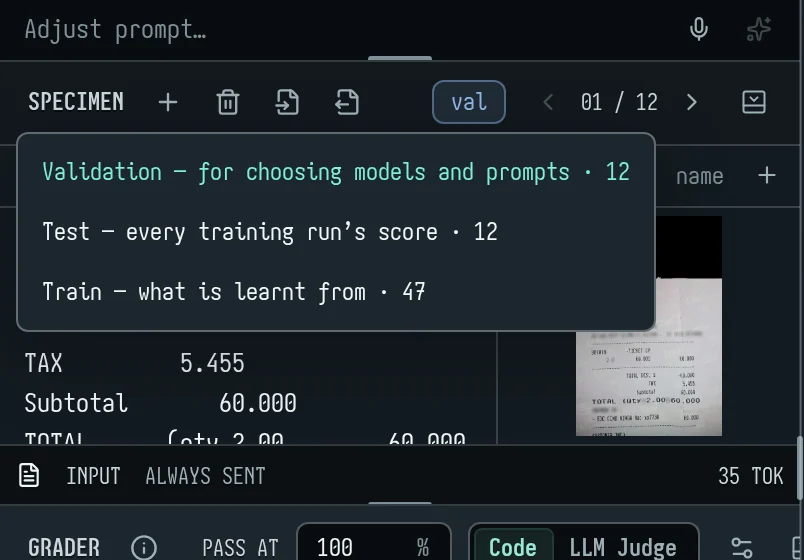
Splits
| Split | What it's for |
|---|---|
| Validation | Comparing models and prompts in Evaluate, and choosing a training run's checkpoint. |
| Test | Every training run's before-and-after score. |
| Held-out sets | Never trained on and never shown to a teacher. Scored in Evaluate when you pick them. Add one with + in the Split head. |
| Train | What the student learns from, and the teacher's examples. |
| Unassigned | Neither trained on nor scored. |
The Split section shows a bar with a thumb per boundary, and a count field per part.
- Moving the split: drag a thumb or type a count, and the rows are dealt.
- Typing a test or validation count takes rows from train. Typing a train count takes them from validation, so test stays put.
- How rows are dealt: by a hash of the input text, test first. Growing test adds rows to it and moves no other.
- Pinned rows: a row you move by hand is pinned and stays where you put it.
- ↺ (Reset): 20% validation, 20% test, the rest train. It also unpins rows.
- Auto assign: when rows are unassigned, this deals them into the parts in proportion.
- Warnings in the Split section:
- no test rows;
- no validation rows (Evaluate then shows test);
- no rows to train on;
- train or validation rows that are near copies of test rows. Each is listed as "S56 ≈ test S53, inputs 63%, answers 100%" with Not a duplicate and Set aside.
From a terminal: pm rows split --val 20% --test 20% deals rows (--all re-deals pinned ones too) and keeps each held-out set's size, and pm rows move S03 S07 --to test places rows by hand; --to also takes a held-out set's name, or none, and a row moved to none stays unassigned. A name no split has yet makes a held-out set of those rows (pm rows move S07-S09 --to hardneg, rows_move to: "hardneg"): hard negatives or adversarial rows, never trained on, left out of --split all, and reported apart in eval_report (held_out) and pm report, never in the headline; eval_run split=hardneg answers them. Agents use rows_split (held: ["big test=10"] sets a held-out set's size) and rows_move.
A split in time: pm rows split --order-by ts --gap 31d --group-by cust (rows_split order_by: "ts", gap: "31d", group_by: "cust") puts the earliest rows in train, then validation, then leaves a gap out, then puts the latest in test, so a model is scored on data later than anything it learnt from. The gap is a span of time (31d, 12h, 2w, 90min; it needs dates) or a count of rows. With --group-by, no customer is in two splits: each customer goes whole to one part (by hash, in proportion to the parts' spans), and their rows outside that part's span are left out. The result says each part's span and how many rows the gap and the customer rule left out (they wait in none). Every row it deals is placed by hand, so a plain rows split afterwards leaves them where they are; held-out sets are not touched.
Mind these:
- A teacher's rows, once accepted, are dealt like any other row, so a later re-deal can move them into validation or test.
- A row moved to Unassigned stays there through later deals; Auto assign places it.
3. Data quality first
Our own end-to-end test runs found the same thing every time: fix the data before you train or trust a score. In the photo-receipts run, about one test label in ten couldn't be passed as written. Fixing labels alone moved validation scores by 2 to 6 points. Taking 47 bad training rows out turned a student that was "no better than base" into one that beat it by 5 points.
The Quality panel
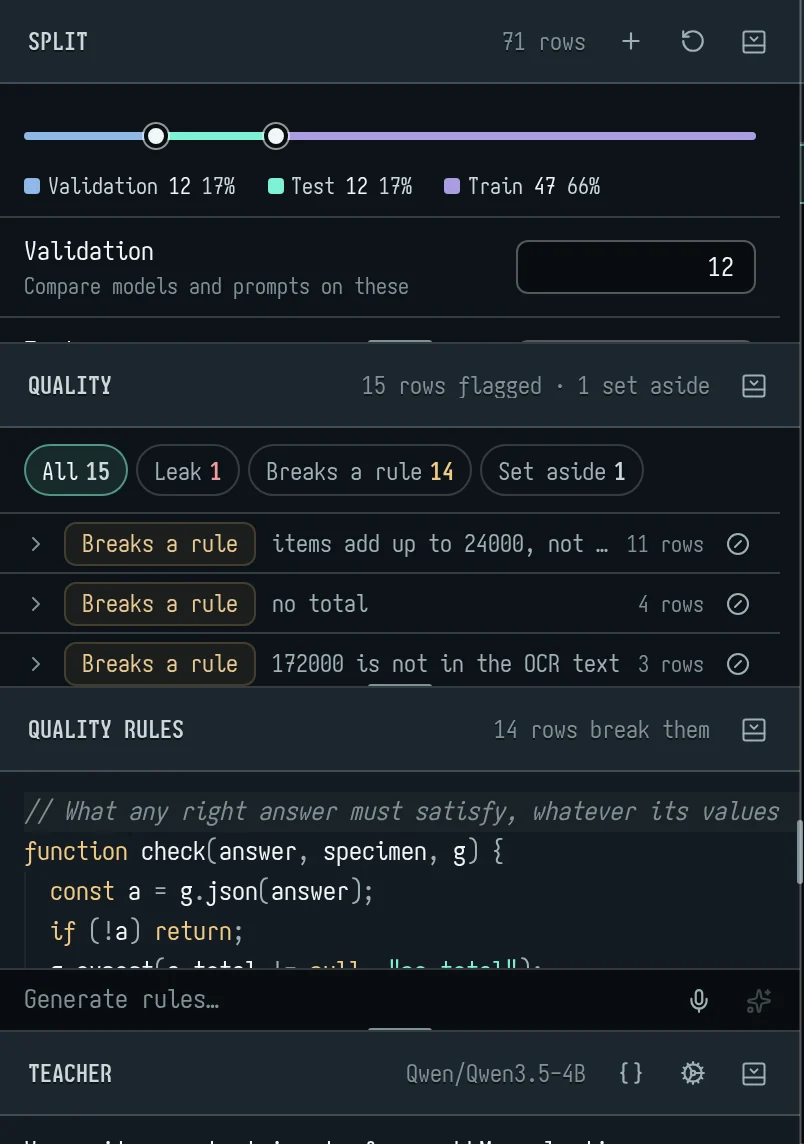
The Quality section in Data checks every row whenever the rows, the rules or the answers change. Its head says how many rows are flagged and how many are set aside. The chips filter by kind:
| Kind | What it means, exactly |
|---|---|
| Leak | A train row nearly the same as a validation or test row. Their inputs share at least 60% of their 5-word runs, and when both rows have answers, those are at least 60% alike too. Rows marked not a duplicate are left alone. |
| No answer | A validation or test row with no expected answer: it can't be scored. |
| Suspect label | Needs a code grader and some answers. The best build fails the row, and at least 2 of the builds (and at least 75% of them) fail it too. Usually the label is wrong. |
| Breaks a rule | The expected answer breaks your label rules (below). |
| Odd keys | When most answers are JSON objects: missing a key that 90% of rows have, or having one that almost none have. |
| Not JSON | When at least 80% of answers are JSON objects, the ones that aren't. |
| Duplicate | The same input (its text and its pictures) twice in one split; or the same expected answer (40+ characters) in one split with inputs that read alike. That is likely the same item twice, such as a receipt photographed twice. |
| Empty | No text and no picture. |
Problems with the same message are grouped, largest group first. On a group you can open the rows or set them all aside. On a single row you can:
- open it, or open the row it collides with;
- edit its expected answer (the pencil);
- set it aside;
- for a leak, mark it Not a duplicate.
From a terminal, pm check lists the issues (--kind leak,rule, --group); an agent uses data_check. data_check also reports inversions (section 4). It can group (group=true), narrow to splits, or write every issue to a JSONL file (path).
For JSON answers, data_audit (pm audit) goes field by field: the cells where at least two builds give the same value, the most common one, and the label says another. Values are compared trimmed, in any case, and numbers by value. It counts disputed cells per field, lists the surest first (field=, min_agree=, limit=), and hands back the fix: rows_edit with the corrected label for one cell, rows_map for many cells of one field and value. Builds agreeing is evidence, not proof: look at the row first.
Label rules are not the grader
They look alike, but they check different things:
| Label rules | Grader | |
|---|---|---|
| Checks | your expected answers | each model's answer |
| Asks | "could this label be right at all?" | "how good is this answer, against the label?" |
| Function | check(answer, specimen, g) |
grade(output, specimen, g) |
| Result | each g.expect failure flags the row |
a score 0–100, passing at the pass mark |
| Runs | in Quality, in data_check, on teacher rows before review |
on every answer in an eval |
| Where | Data → Label rules; Evaluate → Label rules (the same code) | Evaluate → Grader |
Label rules record what any right answer must satisfy, whatever its values. For example: it's JSON with these keys; the items add up to the subtotal; every amount appears in the OCR text.
// What any right answer must satisfy, whatever its values
function check(answer, specimen, g) {
  const a = g.json(answer);
  if (!a) return;
  g.expect(a.total != null, "no total");
  const num = (s) => Number(String(s ?? "").replace(/[^0-9.-]/g, ""));
  const sum = (a.items || []).reduce((t, it) => t + num(it.amount), 0);
  g.expect(Math.abs(sum - num(a.subtotal ?? a.total)) < 1, `items add up to ${sum}, not ${a.subtotal ?? a.total}`);
}
specimen.text(orspecimen.field("input")) is the input;specimen.field(name)is any field.g.json,g.check(zodSchema, value)andg.expect(ok, why)work as in the grader.- Generate rules… under the editor has the assistant draft rules from a few of your rows.
- From a terminal:
pm rules set @rules.js. An agent usesrules_set, which answers with how many expected answers break them.
Does the text give the class away?
Text a teacher writes from a hidden class (a scam, its innocent twin) can carry the class in how it is written: scam chats with their own vocabulary, scam memos longer than the rest. A model scored on such rows learns the writing, not the case, and its score says nothing about real traffic. Check before using them:
pm check --kind separability --class-field pattern --text-field memo
data_check kinds: ["separability"], class_field: "pattern" (and text_field for a field other than the input; splits to narrow the rows) fits two cheap logistic regressions, cross-validated over five stratified folds:
- Style alone: length, word length, casing, digits, punctuation, line breaks and the pattern of character classes, none of the words.
tellsnames the style features most apart, with each class's mean ("length: 42.7 scam vs 29.9 twin"). - Words alone: words and word pairs.
tellsnames the words that weigh most toward each class.
Each comes back as an AUC (0.5 is chance, 1 is a perfect tell) with a verdict — "text leaks the class: AUC 0.93 on words alone" — and an overall verdict on what to do. With more than two classes, each is set against the rest (per_class). Rows set aside are left out; past 4,000 rows a seeded sample is used (sampled_from). Fix a leak at the source — write the twins with the same vocabulary and length — and check again.
Set rows aside
Setting a row aside keeps it in its split but leaves it out: it isn't scored, trained on, or shown to a teacher until you let it back in. It's better than moving the row to Unassigned, because the row and its reason stay where they were.
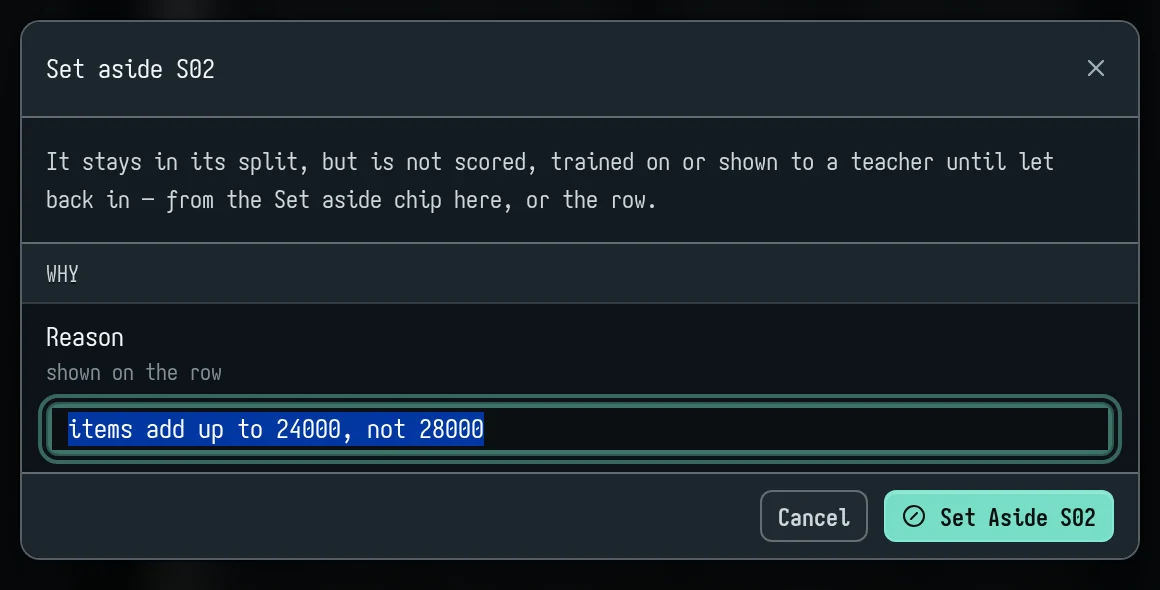
In the app:
- Use the set-aside button on a Quality line or group (it asks for a Reason, prefilled), or right-click → Set aside.
- Set-aside rows are faded, with the reason in their tooltip and a way back in on the row.
- Quality's Set aside chip lists them all, with Let back in.
From a terminal: pm rows exclude S51 --reason "photo cut off" or pm rows exclude --kind rule --reason "labels don't add up". pm rows include lets them back.
An agent: rows_exclude takes rows or kinds (every row data_check flags of those kinds) and a reason; rows_include reverses it.
Mark rows distinct
Receipts from one shop share a header, an address and a footer, so two different receipts can read as a leak. If you've checked them and they're different items:
- In the app: Not a duplicate on the leak's line in Quality, or in the Split warning's list. To undo, right-click the row and have it checked for copies again.
- pm:
pm rows distinct S56 S58;--undoclears the mark. - MCP:
rows_distinct, withundo=trueto clear.
Edit labels, with history
- One row:
pm rows edit S14 --value … --reason "…", orrows_editwith areason. The old value and the reason are kept on the row, androws_getshows its edits. - Many rows:
rows_mapruns one JavaScript function over many rows (map(value, specimen)returns the new value).dry_run=trueshows how many would change, with examples.
Edit test labels with care. Changing test labels after seeing which rows models fail biases the score.
rows_editwarns when you change a test answer models have already answered. Audit test with label rules and photos; usesuspecton validation.
labels=original: eval_report labels=original grades against the labels as first imported, before any recorded edit. Report both numbers.
Edits made in the app are recorded too: one per editing session in a field (from entering it to leaving it changed), and each change the assistant makes to a row.
4. Evaluating
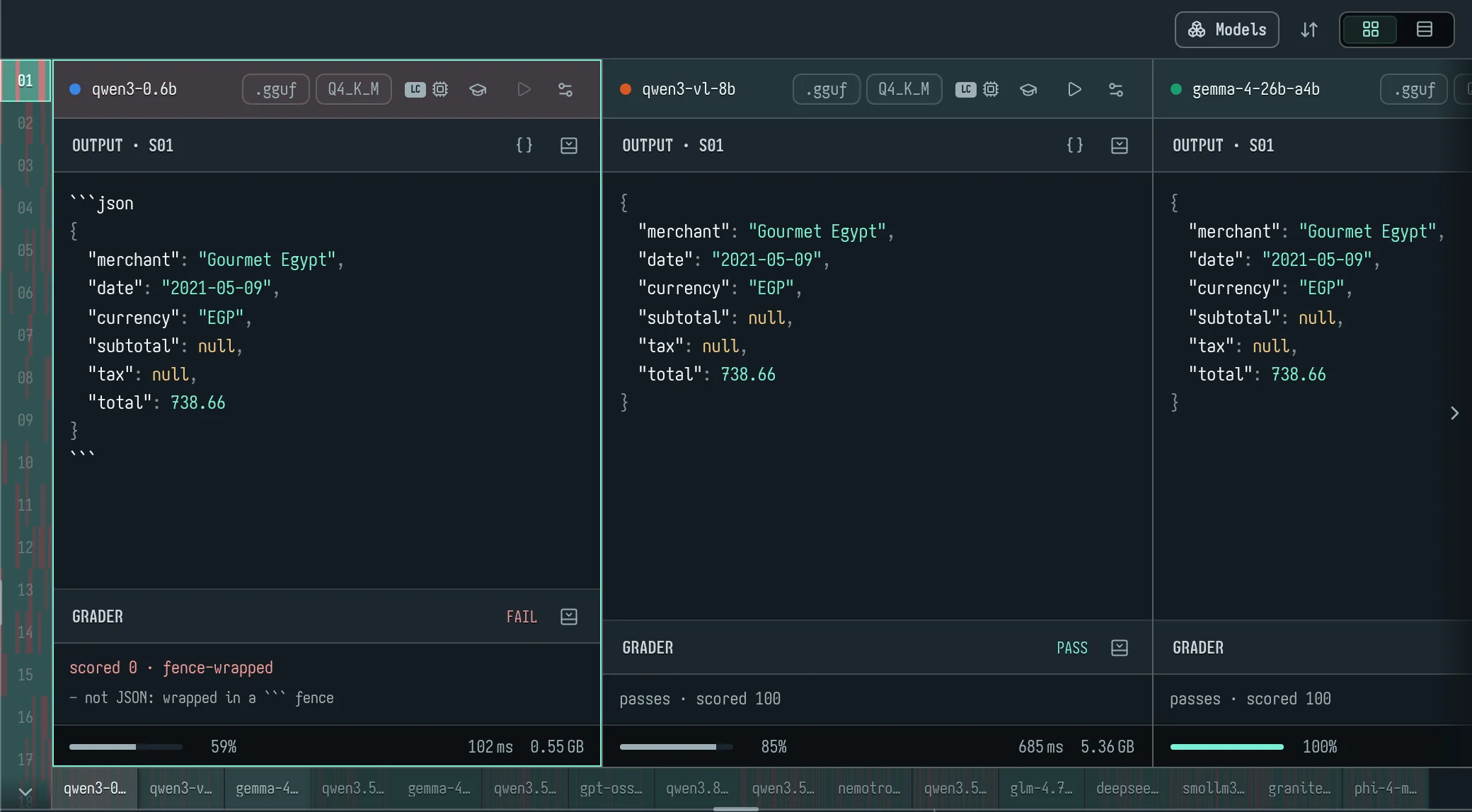
Add builds
Click Models (or the Add model card) to open the model library.
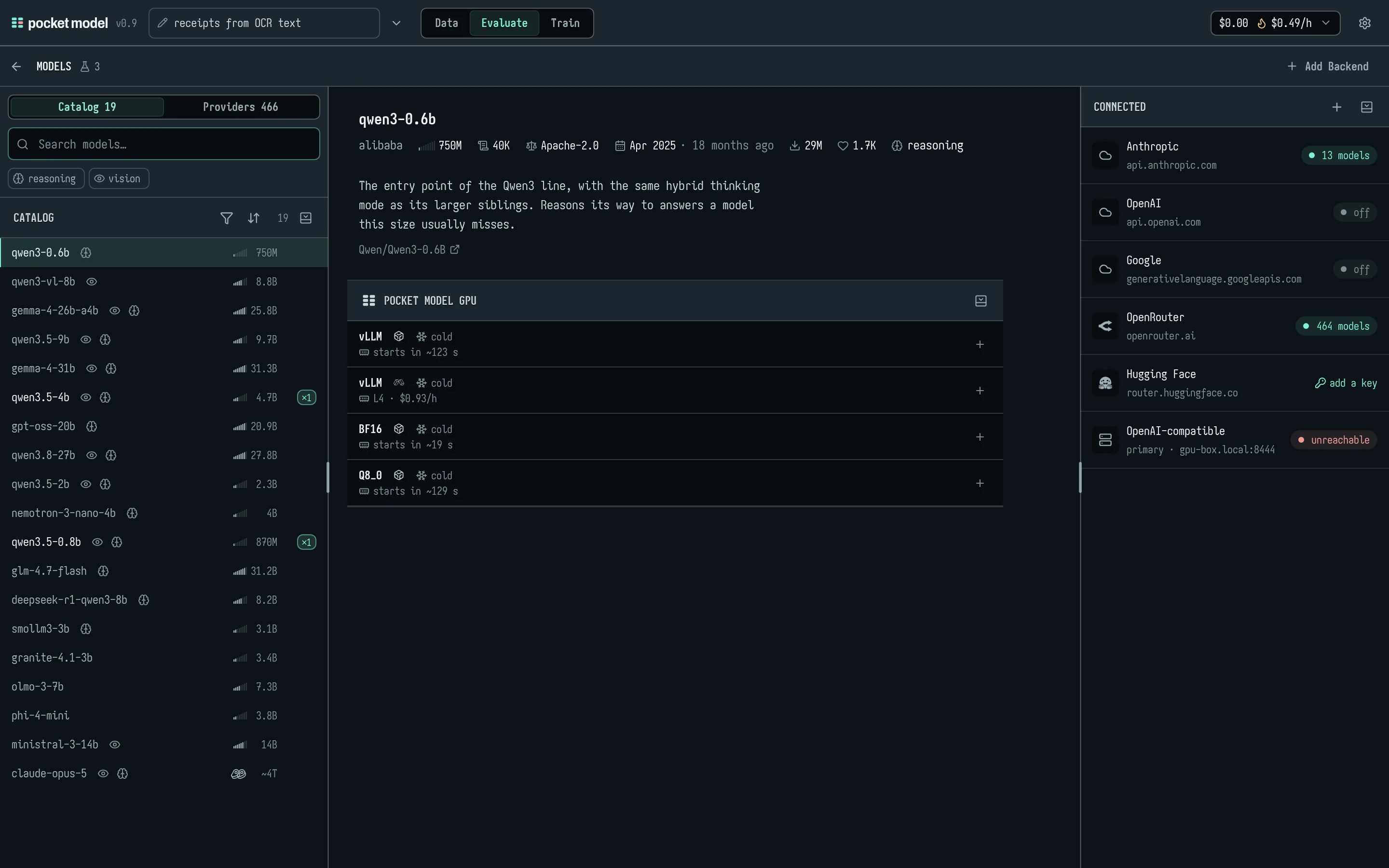
- Catalog: open models, with search and reasoning and vision filters.
- Providers: every model your backends offer.
- Trained: your own runs, at the top.
Open a model to see where it can run:
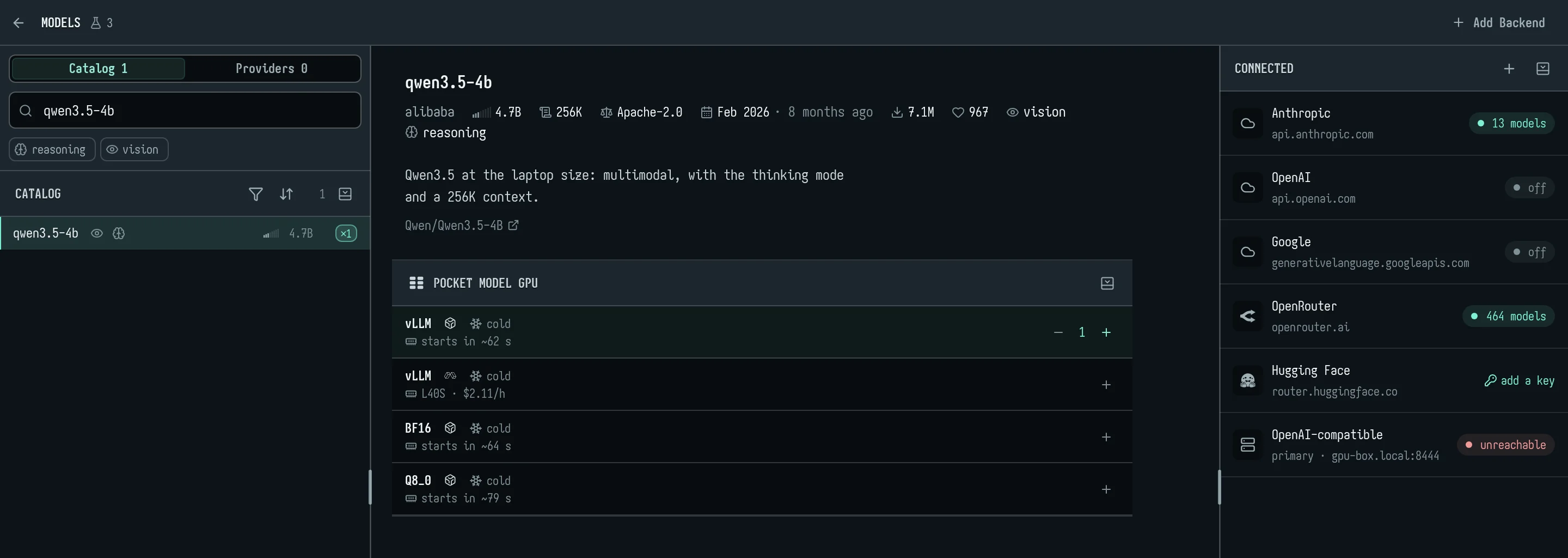
- pocket model GPU: the model on a GPU of your own (
qwen3.5-4b@bullet), made the first time a run calls it and paid by the token at its size's rate (section 7). Its card shows whether it is warm and how long it takes to start;+adds it as a build. It stays cold until a run calls it. - A provider or hosted service: Anthropic, OpenAI, OpenRouter, Hugging Face and the rest. Each needs a key ("add a key").
From a terminal, pm models lists everything: trainable students, pocket model GPU models with their rate and state, your trained runs, and every backend model with its $ per million tokens in and out.
pm build add qwen3.5-4b@bullet anthropic/claude-sonnet-5
A provider model is written <backend>/<model>. A bare model name is refused, and pm suggests the nearest match. Agents use models_list and build_add.
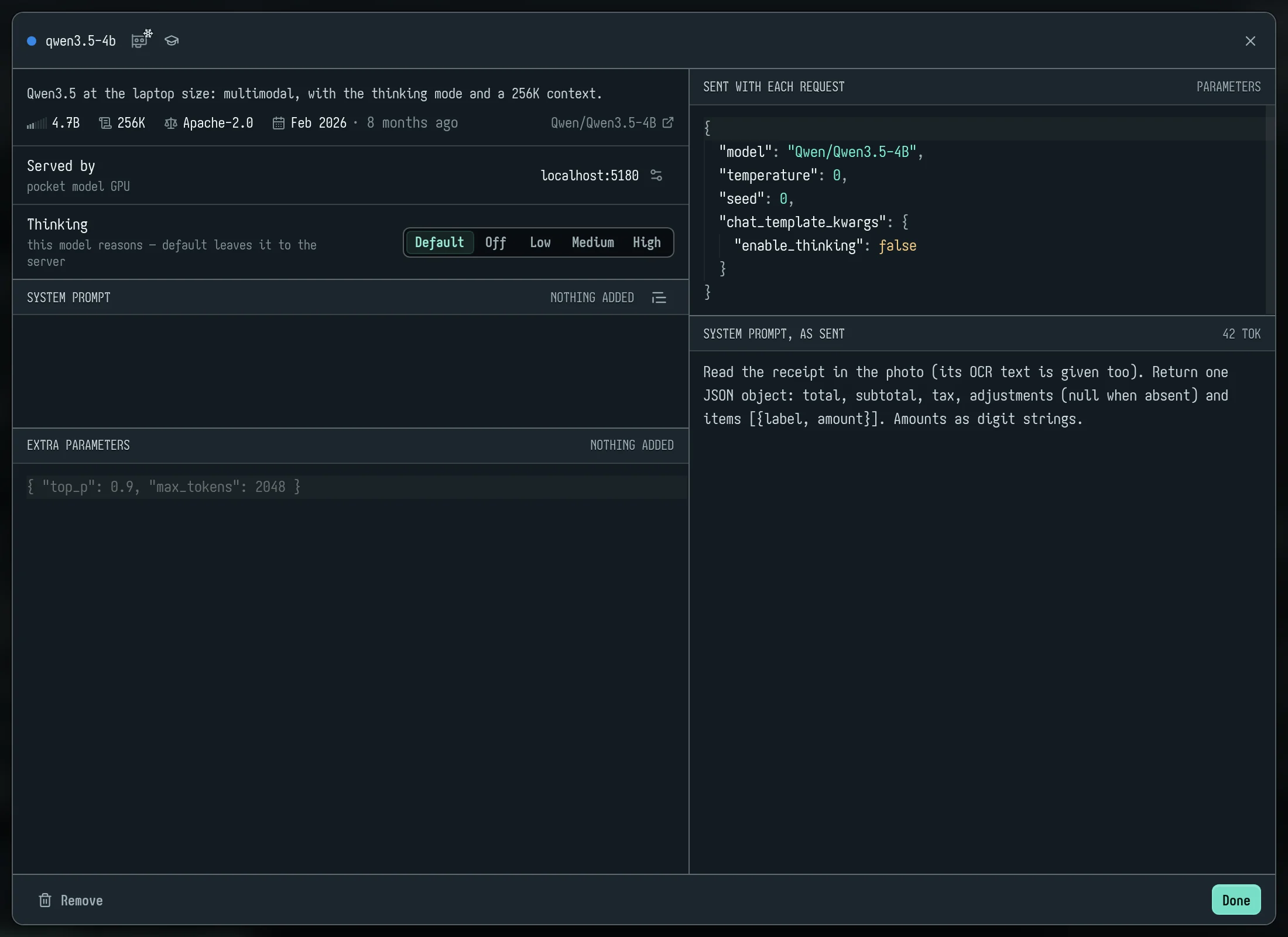
Build settings: the sliders icon on a build's card opens:
- Thinking: default, off, low, medium or high.
- System prompt: an override added after the experiment's, or wrapped around it with
{{system}}. - Extra parameters: JSON merged into every call (
max_tokens,response_format…). - A preview of exactly what is Sent with each request.
Agents use build_set (think, params). GPU models default to thinking off, which is how they're trained.
Choose the rows
- Evaluate scores the split shown in the Specimen head: validation if there is any, else test. Click the split tag to pick Validation, Test, a held-out set or Train.
- Set-aside rows are shown but not scored.
- Synthetic in the results head adds the teacher's rows to what's scored.
Run

The Scope at the foot of the rail picks what Run runs:
| Scope | Builds | Rows |
|---|---|---|
| Cell | the selected build | the row in view |
| Model | the selected build | every scored row |
| Specimen | every build | the row in view |
| All | every build | every scored row |
| Picked | every build | the rows you picked (Ctrl/⌘- or Shift-click on the ribbon) |
The Run button:
- It says Run N calls · M unchanged. An answer is reused when nothing about its call has changed: the model, parameters, prompts, row and seed. Turn reuse off in Settings → Runs.
- Seed sets the run's seed; the dice rolls a new one.
- A snowflake on Run means the run's GPUs are cold, and Run warms them. A turning ring means they're starting.
- While a run is out, the button reads Stop · done / total · time left.
Where the calls run:
- Calls run on the server, in your work queue. Close the tab and they carry on; answers land in the experiment as they come.
- Each backend, pocket model GPUs included, takes Concurrency calls at a time.
- A failing call is retried with backoff. An empty answer is asked once more, then recorded as an error.
Stop cancels every unfinished call of the experiment, including ones an agent started.
From a terminal:
pm eval --split val --wait
pm report --split test --fail-under 85%
pm eval --waitruns every build over the rows.--freshasks again even where an answer is current;--dry-runsays what it would cost and take, build by build, and sends nothing.pm reportprints pass rate, score, errors and speed per build.--fail-underexits with code 5, for CI.- An agent's
eval_runwaits up towait_sseconds (default 120, at most 600, saying how far it is as MCP progress), then returns the run so it can come back witheval_report. Itssplit=allmeans every row except train and the held-out sets.
Read the results
Cards (default): one card per build, showing:
- its Output for the row in view, with JSON highlighted;
- its Reasoning, if it reasoned;
- the Grader's verdict, score and every reason recorded.
The ribbon down the left has a segment per row, split by build into green and red. Click a segment to focus that row; click it again to see the build's Every specimen as a list or grid. The rail of boxes at the bottom jumps to a build.
Table: the icon at the top right switches to a table: Model, Build, Score, P50 and a strip of ticks, one per row. Click a tick to open that answer.
The chart
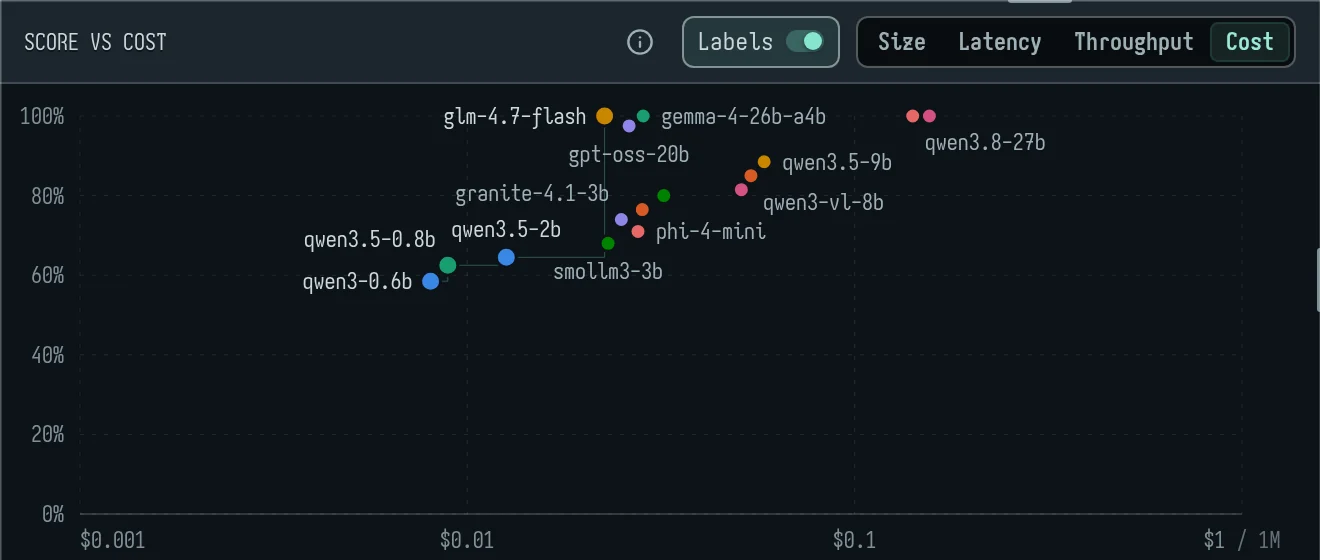
The chart plots each build's score (0–100%) against your choice of axis:
- Size: GB on disk, log scale. Provider models are estimated and marked
~. - Latency: median ms per answer.
- Throughput: median tokens per second.
- Cost: dollars per million tokens, prompt and reply together in this experiment's mix, log scale. The ⓘ explains where each figure comes from: list price, GPU time, your own server (as if rented), or an estimate.
How to read it:
- The frontier is drawn as a staircase, and its dots are larger.
- A trained build has a dotted ring.
- Labels puts each model's name beside its dot.
- Hover a dot for its card: score, value, cost source and published benchmark scores. Click it to select that build.
Latency and throughput leave out a cold GPU's warm-up, so a cold start doesn't make a model look slow. When most of a build's calls waited on a start, what is left of them isn't the model's latency either: no p50 is given, and the latency popover and eval_report say "cold: N of M calls waited on a start" instead.
Timing models fairly: eval_run concurrency: 1 (pm eval --concurrency 1) is a low-load pass: at most that many of the run's calls are out at once, for pocket models and provider models alike, and its pocket models are warmed first (the run waits until they are up, at most ten minutes), so no call times a start. Add fresh: true to time rows already answered. model_ask asks any build of the experiment a few inputs, a provider's model too, one at a time, each answer timed.
Graders
The Grader section in the rail holds the grader's code and the Pass at mark (default 90). Graders are code: JavaScript you write, or have the assistant write. The ⓘ shows the whole API; Generate grader… has the assistant write one from a sentence. With no assistant set up it writes an example grader instead, and a note under the editor says so.
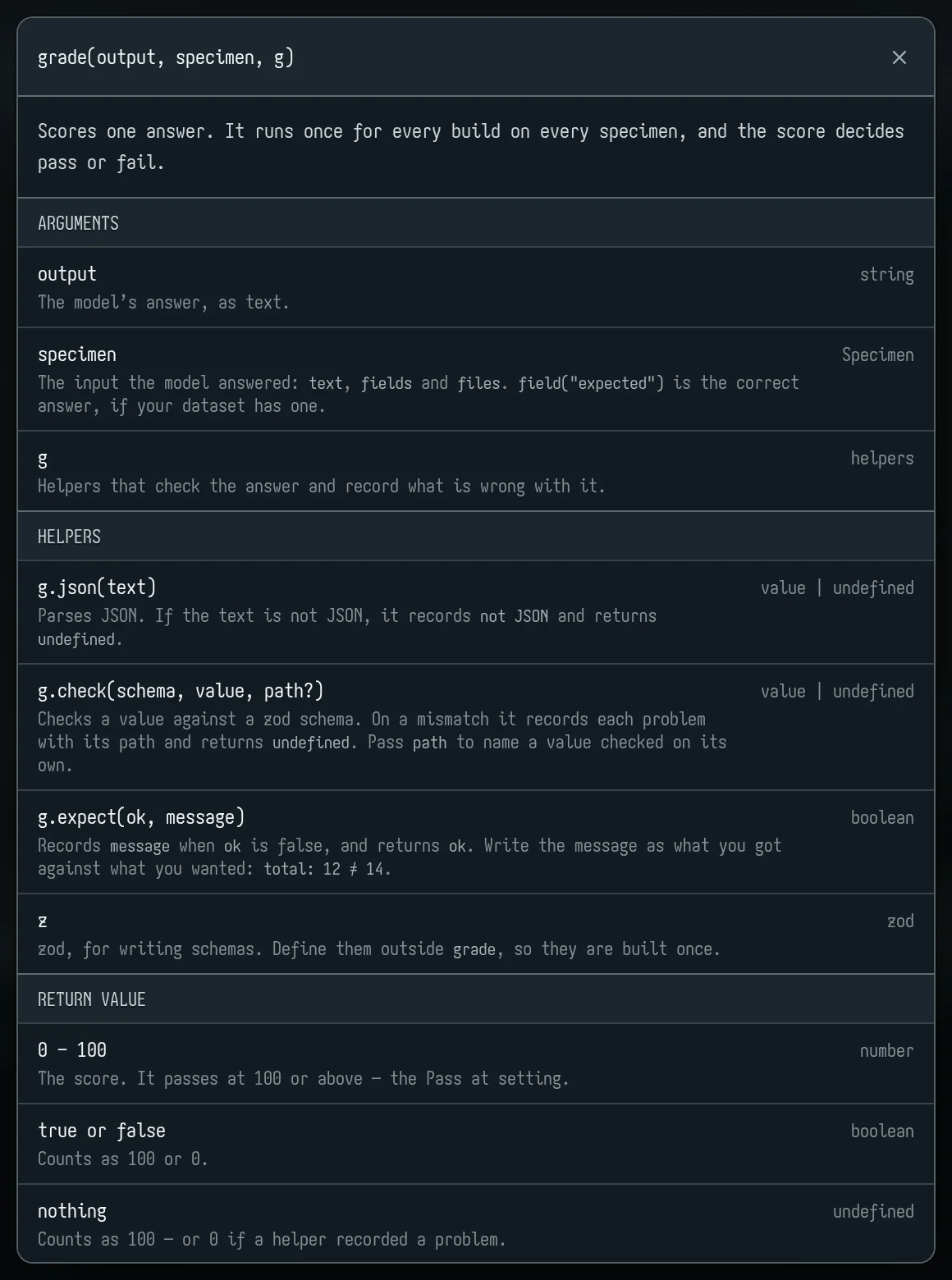
grade(output, specimen, g) returns a score from 0 to 100:
output: the model's answer as text. Inline<think>blocks are split out.specimen: the row.specimen.textis the input,specimen.field("expected")the answer, andspecimen.field(name)any field.g.json(text): parses JSON, or records why not ("wrapped in a ``` fence", "empty").g.check(schema, value): checks a value against a zod schema and records each mismatch with its path.g.expect(ok, why): recordswhywhenokis false.g.metric(name, value): a named part score.true/falseor 0–1, averaged over answers;g.metric(name, count, "sum")adds up counts instead (tp/fp/fn for an F1);g.metric(name, part, "ratio", whole)is one total over another, Σpart ÷ Σwhole, whicheval_reportgives with its 95% interval (ratios, resampling the rows as for F1) — dollar-weighted recall isg.metric("usd_recall", flagged && fraud ? amount : 0, "ratio", fraud ? amount : 0). Each answer's grade line shows its parts ("total 1 · items 0.60"), andeval_reportgives each build's.g.score(score, positive): the row's number to rank by, higher meaning more likely positive (a risk level, a probability), and whether the row really is positive:g.score(level, fraud). Beside the pass/fail,eval_reportranks each build's rows by it (ranking): recall and precision at each percent of rows flagged (at_k, default 1, 2 and 5%;pm report --at-k 1,2,5), AUC-PR (average precision), and, withprevalence(--prevalence 0.12%), the precision traffic at that share of positives would see, each negative re-weighted by (P/N)·(1−π)/π — for a test set richer in positives than real traffic. Rows with equal scores are taken together: a cut through them takes each in equal part (what a random order gives on average), and the curve steps once per distinct score, so the same rows always give the same numbers. A model that answers a level 1–5 ties many rows; a finer score (a probability) ranks better.levelssays how many distinct scores a build gave, a cut that ends in a tie says so (tie: its rows, how many were flagged from it, and the recall had it been ordered), andties_warningnames the cuts a tie holds down: "qwen3.5-4b answers 5 distinct levels; its top 1% is a tie, split evenly". State the positives' natural share once withexperiment_prevalence share: 2%(pm prevalence 2%) and every report gives precision re-weighted to it, withoutprevalenceon each call.g.reward_cost({ level, positive, amount, missed, false_alarm }): a cost-weighted score to return, so a GRPO run learns your costs rather than a pass mark. Below.z: zod.- Return value: a number is the score;
true/falsecounts as 100 or 0; returning nothing counts as 100, or 0 if anything was recorded.
A fail also names its shape when it can: fence-wrapped, prose preamble, truncated or wrong values.
From a terminal: pm grader set @grade.js --threshold 90. grader_set answers with a self-check: each row's own expected answer, graded. All should pass; if they don't, the grader is wrong.
A cost-weighted reward (GRPO)
GRPO learns whatever the grader's score rewards. A table like "level 1 on a legit row 100, level 5 on fraud 100, anything else 0" pays a model that always answers 1 about 95 on 5% fraud, and a run can settle there. g.reward_cost scores an answer by what it would cost instead:
- The answer is a strength of flag: a level on 1–5 (1 is no flag, 5 a full one, 3 half), a probability with
levels: [0, 1], or true/false. - A positive row costs
amount × (1 − flag)²(or the fixedmissedwith no amount); a negative rowfalse_alarm × flag². The score is 100 less that cost as a share of the row's larger cost (or ofcap, when you give one: then a mean score weighs rows by their dollars). - The square matters: for a row the model thinks is positive with probability q, the answer earning most on average is q·M ÷ (q·M + (1 − q)·F) — a calibrated middle level for an uncertain row, not a push to 1 or 5 — and it passes the middle of the scale exactly when q ≥ F ÷ (F + M), the threshold the costs set.
- Each answer's cost is recorded as the part
cost, summed:eval_reportshows each build's total.
A worked example: an analyst's review costs $15 a flagged row, a missed fraud its amount.
function grade(output, specimen, g) {
  const level = Number(/RISK_LEVEL: ([1-5])/.exec(output)?.[1] ?? 0)
  if (!g.expect(level, "no RISK_LEVEL")) return 0
  const fraud = specimen.field("label") === "fraud"
  const amount = Number(specimen.field("amount"))
  const flagged = level >= 3                       // the middle of the scale: the costs' threshold
  g.metric("tp", flagged && fraud ? 1 : 0, "sum")
  g.metric("fp", flagged && !fraud ? 1 : 0, "sum")
  g.metric("fn", !flagged && fraud ? 1 : 0, "sum")
  g.metric("usd_recall", flagged && fraud ? amount : 0, "ratio", fraud ? amount : 0)
  g.score(level, fraud)
  return g.reward_cost({ level, positive: fraud, amount, false_alarm: 15 })
}
- A $500 transfer is worth flagging at a 2.9% chance of fraud (15 ÷ 515); a $40 one at 27% (15 ÷ 55). The model learns both from the one reward.
- On 5% fraud with amounts from $20 to $500, answering 1 to everything scores 95, 5 to everything 87 and 3 to everything 95.5; a model that knows the rows scores near 100, so no constant answer is the best a run can find.
train_plan method: grposhows what each constant answer earns on your train rows (constant_answers). - Set the pass mark (
threshold) to what counts as a right decision for you, e.g. 90: the pass rate then reads as "decisions that cost less than a tenth of their worst".
Inversions against published scores
pocket model knows published benchmark scores for 40 models: the Artificial Analysis Intelligence Index, GPQA Diamond, and MMMU-Pro for rows with pictures.
An inversion is a model expected to do better doing clearly worse on the same rows. "Expected to do better" means:
- at least 3 points ahead on the published benchmark; or
- a run trained here, compared with its own base.
"Clearly worse" means the stronger model fails at least 3 more rows than it passes against the weaker one, and at least twice as many.
An inversion almost always points at the experiment, not the model:
- a wrong label;
- a grader rejecting a right answer;
- an answer cut off by
max_tokens.
Where they show:
- In Evaluate, a line over the results: "A was expected to beat B (AA index 57 vs 38) but passed 12 vs 20 of 50. Check the expected answer and the stronger one's output on S04 S11 …". Each row link opens that row on the build that failed it.
- The chart's dots carry a mark.
- In
eval_report,data_check,train_evalandpm report.
Compare a run with its base
train_evalreturnsvs_base: the rows the trained model gained and lost against the model it was trained from. Each lost row comes with the train row most like it, so you can see what taught it the wrong thing.eval_report compare=[a, b]does the same for any two builds.eval_report compare=[a, b, c] reference=[x, y]sets each build against each reference in one call (compare_matrix;pm report --compare a,b,c --reference x,y): per pair the difference in F1 where the grader sums tp/fp/fn, else in pass rate, its 95% interval and a verdict (better, worse, no real difference).group_by: <field>(pm report --group-by cust): every interval — pass rate, mean score, F1, ratios, compare's differences — resamples whole groups (a customer's rows) instead of rows. Rows of one customer are not independent draws: fraud comes in sprees, and a row-level interval on 150 frauds from 29 customers is far too narrow. A row with no value in that field is a group of its own;intervalssays how many groups there were.pass_ratecounts errors as misses;pass_rate_answeredbeside it leaves them out.eval_exportwrites every graded answer to a JSONL file, for your own analysis, each line with the row's own fields and itsuid(it survives edits,rows_mapand experiment copies: join on it).export of=resultsdoes the same with filters, as CSV or JSONL, andresults_queryanswers questions about them (the failing rows of one build, a confusion table) without a file.
Your own model's answers as a build
A classical baseline — gradient boosting, a logistic regression, your rules run as code — answers on your own machine. Bring its answers in as a build and every comparison above covers it, on the same rows, graded by the same grader:
pm export rows --fields uid,input,field.amount --out rows.csv     # the rows, with their uids, for your model
python score.py rows.csv > lightgbm.csv                          # uid, level ("RISK_LEVEL: 4"), p (a probability)
pm build import lightgbm.csv --name lightgbm --key uid --answer-field level --score-field p
pm report --split test --compare "#1,#2" --reference lightgbm --group-by customer_id
build_import(pm build import) reads a CSV, JSON or JSONL file. Each record names its row bykey:uid(the row's own id),row(S03 or its number), or any field the rows have (a transaction id);key_fieldnames the file's column when it is called something else.answer_fieldis the answer as the grader reads one;score_field, optional, a number the rows rank by (a probability) in place of what the grader'sg.scoremakes of the answer — the grader still says which rows are positive.- The build is marked imported: nothing is ever asked of it (
eval_runplans no call for it), it costs nothing and has no latency.eval_report,compare,compare_matrix,group_by, the ranking, the held-out sets,results_query(builds: ["imported"]) andeval_exporttreat it as any build. - Importing the same name again replaces its answers. Records that name no row here are counted and the first few listed, so a join on the wrong key shows at once.
A two-stage system. eval_report two_stage: {first: "lightgbm", second: "#2"} (pm report --two-stage lightgbm,#2) reports the system where the first build's flags stand and the second decides the rows the first let through: it may add a flag, never remove one. On each row the system's verdict is the first's where it flagged, else the second's, so it gets every figure a build gets — pass rate, F1, dollars caught, the ranking (the first's flags first, then the second's score), each with its interval and by group — beside each build alone on the same rows, with the paired differences against each (vs_first, vs_second): what the second stage adds, and whether it is real. A row counts as flagged where the grader counts a tp or fp on it, so the grader must count them (g.metric("tp", …, "sum")). Its cost is the first's on every row and the second's on the rows it reviewed.
5. Teachers and training data
A teacher is a strong model that makes training rows. It can work two ways:
- Write new rows like your train rows (
synth_run, or Generate in Data). - Answer inputs you already have (
synth_label,pm synth --inputs). This is usually the better data: real inputs, a teacher's answers.
In the app: the Teacher section
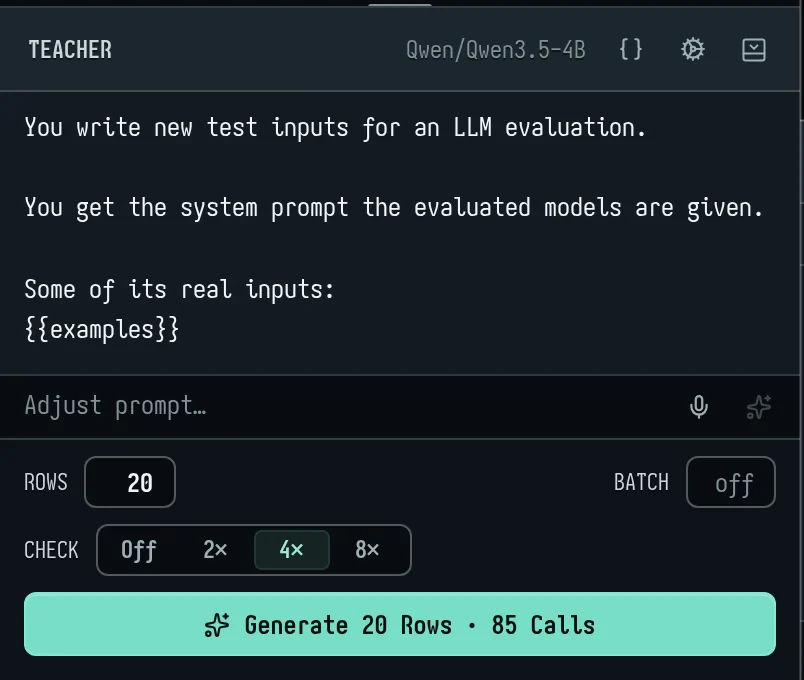
The teacher: the cog (Choose the teacher) picks one. Your builds are listed by score, and you can add any model from the library.
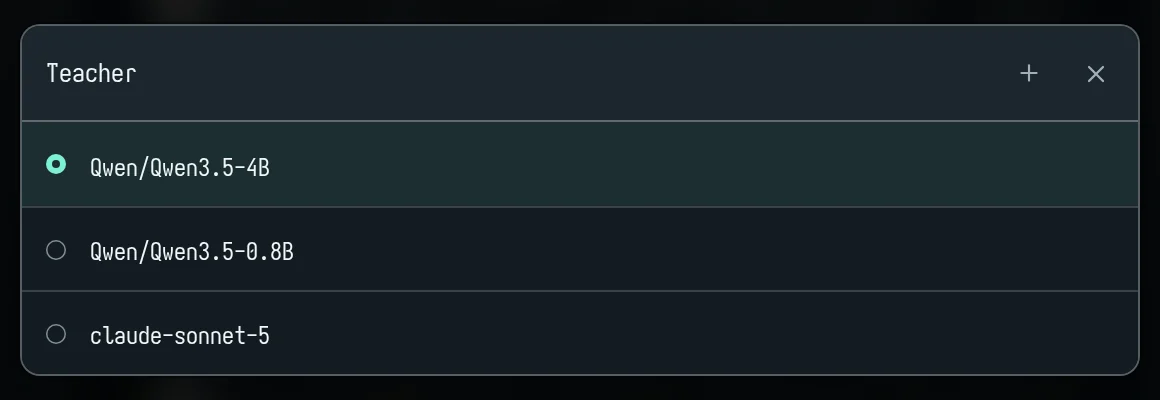
Teacher prompt: the teacher's instructions. Insert examples adds references that show it train rows:
{{examples}}: a few train rows, new each call;{{misses}}: train rows the student gets wrong; pick whose misses in Misses of;{{train}}: every train row;{{S01}}or{{S01-S05}}: particular rows.
Rows: how many to make, up to 2,000.
Batch: off means each answer is its own call. A number has the teacher write that many inputs with their answers per call (at most 200).
Check: each answer is asked 2×, 4× or 8× and kept only if the answers agree: all of them at 2, 3 of 4, 6 of 8. Strings are compared ignoring case and spacing.
Generate N rows · C calls · ≈$X starts the batch. A snowflake means its GPU is cold.
What the server does with a batch
- No near copies of held-out rows: a new input that nearly copies a test, validation or held-out input (60% alike) is dropped, as is one that nearly copies another row of the same batch.
- Kept rows land in train, marked new. They aren't trained on or shown to the teacher until you accept them.
- Rule check (pm/MCP):
synth_run,synth_labelandsynth_statusdrop new rows whose answers break your label rules or the answer format, unlesscheck=false. Code fences are stripped from answers first. - The record: Calls in the lower pane shows each teacher call: what was asked, the reply, the reasoning.
synth_status dropped=truelists what was dropped and why.
Label real inputs (pm and MCP)
pm synth --inputs unlabeled.jsonl --teacher qwen3.8-27b@bullet --samples 2 --dry-run
pm synth --inputs unlabeled.jsonl --teacher qwen3.8-27b@bullet --samples 2 --wait
- Inputs: the file is read like
rows_import; its answers are ignored. Pictures are sent too, so a vision teacher labels from the photo, and the record's other fields are kept. - Agreement: each input is asked
samplestimes (1, 2, 4 or 8) and kept only if the answers agree. Our test runs kept 71–73% atsamples=2. - The estimate:
--dry-run(dry_run=true) gives only the estimate, and says what it's based on (this teacher's answers here, or a typical length). - The cheaper-teacher hint: if another build scored as well as the teacher on validation for under 90% of the price an answer,
synth_labelandsynth_runname it ascheaper. Use it.
Review
New rows wait for you:
- In the app: a banner "N new rows from the teacher" with Accept all and Reject all; ✓ and × on each row; or right-click → Accept. Reject deletes the row.
- pm:
pm review,pm review accept S70-S90,pm review reject --all. - MCP:
review_list,review_accept,review_reject.review_accept clean=trueaccepts only rowsdata_checkfinds nothing wrong with and leaves the rest for you.
Ids shift when you reject. S-numbers are positions, so rejecting or removing rows renumbers the ones after. Use uids (from
rows_listorreview_list), or do edits first and rejects last.
What our test runs learned:
- Check teacher rows like any data. Export them with
rows_export only_new=trueand rundata_check. - Cross-check against a second strong model: add it as a build,
eval_runover the new rows, and reject the disagreements. - Choose the teacher only after the prompt is final.
6. Training
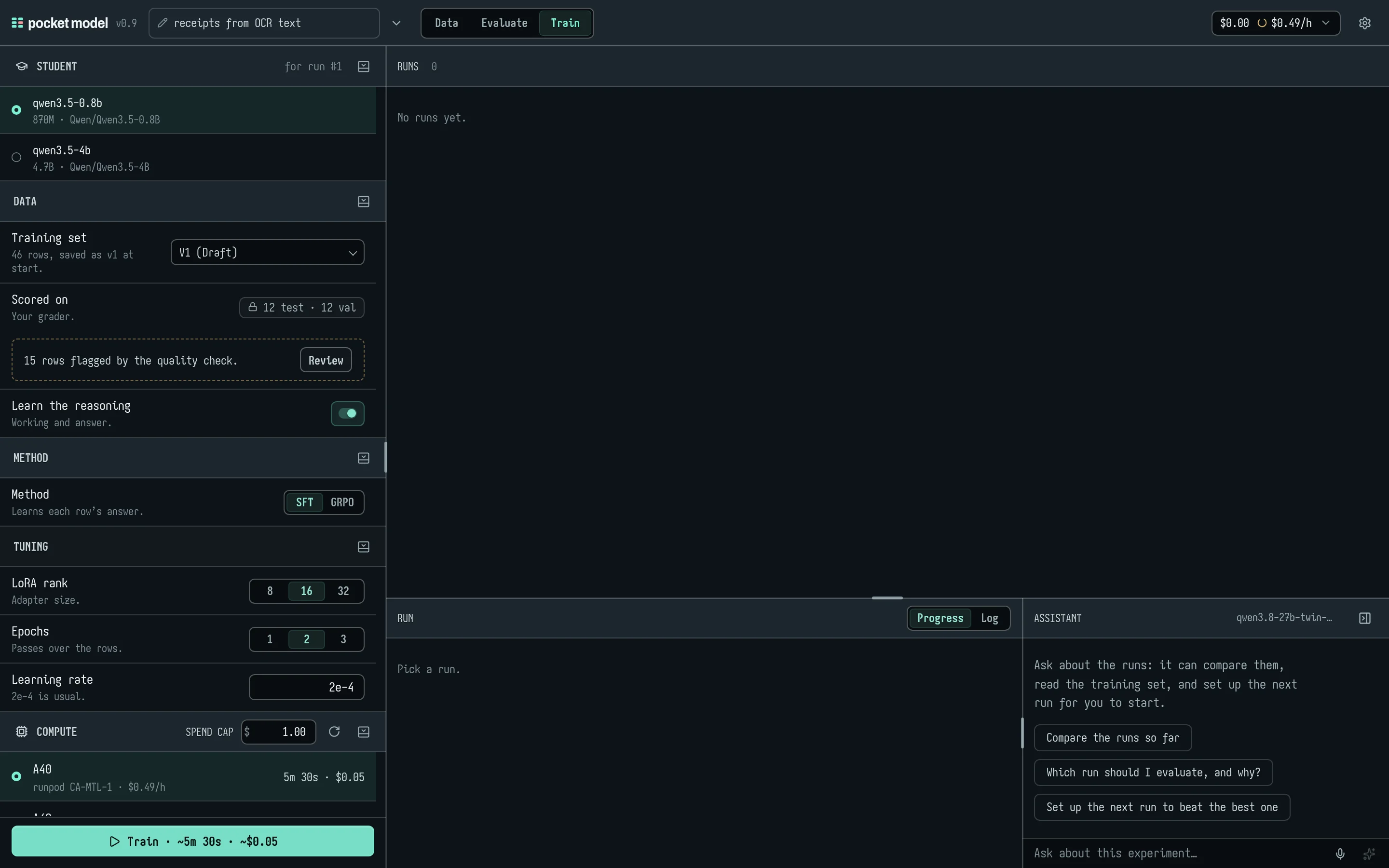
Plan
The Train stage's rail is the recipe:
- Student: the trainable models already in this experiment, with their current score. Add one from the library if none is listed.
- Data:
- Training set: the draft, or a saved version.
- Scored on: the test and validation rows, with your grader.
- A warning if Quality flags rows, with Review.
- Learn the reasoning: train on the rows' reasoning too.
- Method:
- SFT learns each row's answer. The loss is on the answer's tokens only, and the best checkpoint on validation is kept.
- GRPO learns from your grader: it samples answers and rewards them with the grader's score. It needs a code grader, and can start from an earlier run (Start from).
- Tuning: LoRA rank 8/16/32, Epochs 1/2/3 (SFT), Steps 50/100/200 and Answers per prompt 4/8/16 (GRPO), Learning rate (2e-4 usual for SFT, 2e-5 for GRPO). Defaults: rank 16, 2 epochs.
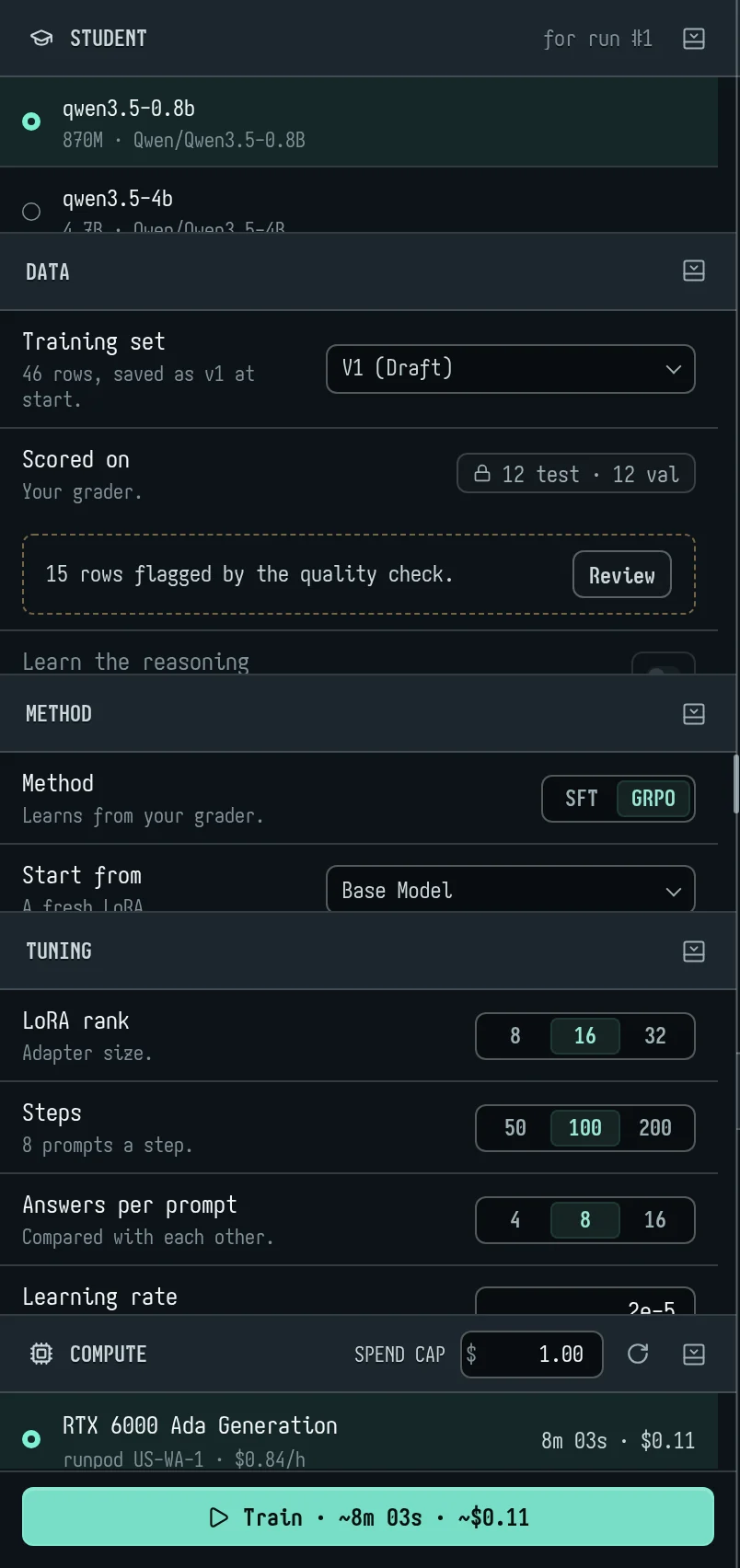
The button at the foot says exactly what will happen: Train · ~14 min · $0.65, the run's quote, charged when it starts (section 7); or why it can't yet ("GRPO needs a code grader", "Make training rows").
Students:
| Student | Size | Takes pictures |
|---|---|---|
| qwen3.5-0.8b | 870M | yes |
| qwen3.5-2b | 2.3B | yes |
| nemotron-3-nano-4b | 4B | no |
| qwen3.5-4b | 4.7B | yes |
| gemma-4-e2b | 5.1B | yes |
| gemma-4-e4b | 8B | yes |
| qwen3.5-9b | 9.7B | yes |
| gemma-4-12b | 12B | yes |
| gemma-4-26b-a4b | 25.8B | yes |
| qwen3.8-27b | 27.8B | yes |
| gemma-4-31b | 31.3B | yes |
From a terminal:
pm train plan --student qwen3.5-4b --epochs 3
It prints the rows, the planned minutes and the quote. train_plan with_new=true counts unreviewed teacher rows too, so you can price training before review.
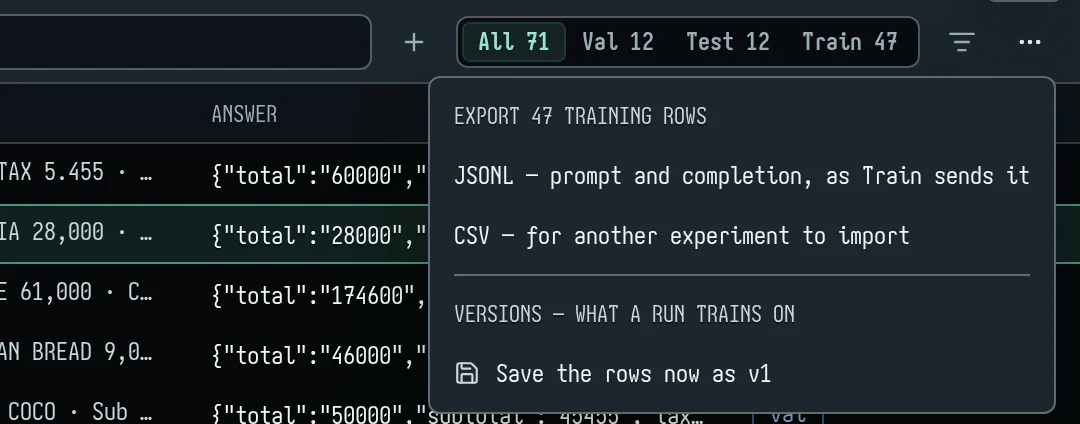
Versions and exports: the ⋯ menu in Data's rows header saves the rows now as a version (what a run trains on), lists the last versions, and exports the training rows as JSONL (prompt and completion, as Train sends them) or CSV.
Start, and follow
In the app, press Train:
- The draft is saved as a version, frozen, and the run's exact files are kept with it.
- The run appears in Runs: run number, model, method, what it trained on, start, time, cost, GPU, and Test score as before → after.
- The lower pane shows its phases with their durations (Queued → Staging → Pod → Hydrating → Training → Evaluating → Verifying → Done), and the training loss (or GRPO's reward).
- Log shows the training log, to copy or export.
From a terminal:
pm train start --student qwen3.5-4b --epochs 3 --wait
For GRPO, --steps, --group and --from (an earlier run: #n, latest or a job id) are there too. An agent uses train_start with the same options, then train_status run="#1" for where it is now (at once, with its time left), or train_wait run="#1" to wait for it to end. A wait is at most 600 seconds, and says how long it has waited as MCP progress as it goes; a long run takes a few calls.
What our test runs measured:
- A 4B LoRA on 366 text rows took about 12 minutes on an A40 and cost $0.16.
- On 496 rows over 3 epochs: about 16 minutes, $0.23.
- With photos the same run plans about 4× longer.
- Three epochs beat two in the receipts run, though the default is two.
Stopping:
- In the app: Cancel run N in the rail. It reads Cancelled.
- pm:
pm train stopreports "stopped at step N". - A run with no word from its GPU for 5 minutes shows as failed with Stop, because its GPU may still be billing.
Pictures (vision LoRA)
When rows have photos and the student can see, the training files carry the photos, and the LoRA trains on the language model with the vision tower frozen.
Guardrails in pm:
train_planandtrain_statusreportpictures. For a photo task it must equal the row count.pmrefuses to start if the training file carries fewer pictures than the rows have.- It warns that GRPO trains on text only, so pictures would be left out.
- The server turns away a
pmtoo old to send pictures (HTTP 426).
In the app the Train page checks the same, in its Data section: Pictures: N rows counts the training rows that carry them; under GRPO it says in red "GRPO trains on text only: they are left out."; and a student that can't take pictures holds Train, with Use a vision student or Add a vision model.
Reasoning distillation: the teacher reasons, code decides the label
A small model can learn to reason through a case before it answers, from a large model that thinks. When your labels come from code — a generator that knows each scenario's truth, rules over records, a ledger — let the teacher write only the reasoning, and keep a row only where its reasoning reaches the label your code gave. The student then learns reasoning that ends in the right answer, never a teacher's mistake. Every step below is an existing tool; the pm form follows each.
Write the inputs and their labels in code. One record a line: the input the student will see, and the label under a name that is not an input or answer name (
truth, notlabelorexpected, which an import takes as the answer). Other fields (an id) ride along.{"input": "Onramp $480 to a new wallet, card from a prepaid issuer, account 2 days old…", "truth": "RISK_LEVEL: 5", "id": "t0001"}Import the test and validation rows from the same generator as ordinary rows, the label as
expected(rows_import split: "test";pm rows import test.jsonl --split test).A label rule that compares the teacher's answer with the code's. Label rules run on every new teacher row, and a row breaking them is dropped (
check, on by default):function check(answer, specimen, g) { const truth = specimen.field("truth") if (!truth) return // rows from elsewhere: nothing to compare const level = (t) => /RISK_LEVEL: ([1-5])/.exec(t)?.[1] g.expect(level(answer) === level(truth), `the teacher said ${level(answer)}, the code ${level(truth)}`) }rules_set code: …(pm rules set @rules.js).Price it, then ask a thinking teacher, one input a call.
batch: 1so each input gets its own thinking (a batched call thinks once for twenty inputs);samples: 1, since the code is the check; thinking on, and room for it inmax_tokens. A teacher that thinks natively has its thinking kept as each row'sreasoningfield; one that does not can be asked to write it, withfields: ["reasoning: the steps that reach the answer"].synth_label {"path": "seeds.jsonl", "teacher": "qwen3.5-27b@bullet", "batch": 1, "samples": 1, "think": "high", "max_tokens": 6000, "dry_run": true}pm synth --inputs seeds.jsonl --teacher qwen3.5-27b@bullet --batch 1 --samples 1 --think high --max-tokens 6000 --dry-run. The dry run gives calls, tokens and dollars; a thinking teacher writes far more than its answer, and the estimate learns its real length from the first calls (run a few dozen seeds first). Then the same withoutdry_run(--wait).See what was kept.
synth_status run=<run> dropped=truelists the rows the rule dropped — where the teacher reasoned its way to another level than the code — with what it answered: their share is how far the teacher agrees with your labels, and a high share is worth reading before training on the rest.rows_query {"new": true, "fields": ["row", "expected", "field.reasoning"], "limit": 3}shows a few kept rows with their reasoning;rows_query {"new": true, "where": {"field": "field.reasoning", "op": "missing"}, "agg": "count"}counts rows with none (a teacher that did not think). Accept the clean ones:review_accept clean: true(pm review accept --all).Train on the reasoning.
train_start {"student": "qwen3.5-4b", "method": "sft", "reasoning": true, "select_by": "f1"}(pm train start --student qwen3.5-4b --reasoning --select-by f1 --wait): each row teaches<think>+ its reasoning +</think>and then the answer, the loss on that reply alone. Price it first withpm train plan --student qwen3.5-4b --reasoning: the reasoning makes each row several times longer than its answer, and a plan without--reasoningprices the answers alone (MCPtrain_plantakes noreasoningyet). Follow it withtrain_status run=latest wait_s=600.Evaluate it as it was trained.
train_eval run=latestasks the run thinking, as it trained, on the test rows. If answers come back cut (cutin the report: the thinking ran out of room), raise its build's limit withbuild_set build=<key> max_tokens=4096andeval_runagain. Set it against an answer-only run of the same student:eval_report compare=["#2", "#1"](withgroup_bywhere rows come in groups).
Evaluate a run
In the app: a finished run has Evaluate. It adds the trained model as a build (LoRA #n) and runs it beside the others.
- It's served on your own endpoint for its base, with the run's adapter (
qwen3.5-4b@bullet+<run>). - The adapter takes about a minute to be ready after the run ends; Evaluate waits up to 3 minutes.
pm / MCP: pm train eval latest --split test --wait or train_eval. It adds the run as a build, scores it on test by default, and returns:
- its result;
vs_base: the rows gained and lost against the base, each lost row with its most similar train row;- the other builds' pass rates.
Two scores, two meanings:
afterintrain_statusis the trainer's own test score for the chosen checkpoint, in transformers with greedy decoding.train_evalscores the model as served.
A trained model is asked as it was trained (one user turn, thinking off), so the two should agree. If they don't, look at answer length and format.
Download, serve
In the app: the download icon on a finished run lists its files:
- GGUF, for llama.cpp: a LoRA adapter, used on the 8-bit base.
- PEFT weights: safetensors and config, for vLLM or transformers/peft.
"Not kept yet" means wait a minute after the run ends.
pm:
pm train download latest --format peft --out ./adapter
pm serve latest
pm chat latest "TOTAL 60.000 ..."
pm train export(train_export) merges a finished run's LoRA into its base as one model, for runtimes without adapter support: HF safetensors and/or GGUF (bf16,q8_0,q4_k_m). It runs on CPU, so it costs no GPU time (bases up to about 10B);--dry-runsays what it would take.pm train download(train_download) saves the files:peft,gguf,merged(after an export) orall.pm serve(serve_info) prints an OpenAI-compatible base URL,https://app.pocketmodel.ai/serve/<model>/v1, for your own code, and what a call costs. Authenticate with your pm token asAuthorization: Bearer pm_…. The first call warms the GPU.pm chatsends one message with the experiment's system prompt.
7. Cost
The spend meter
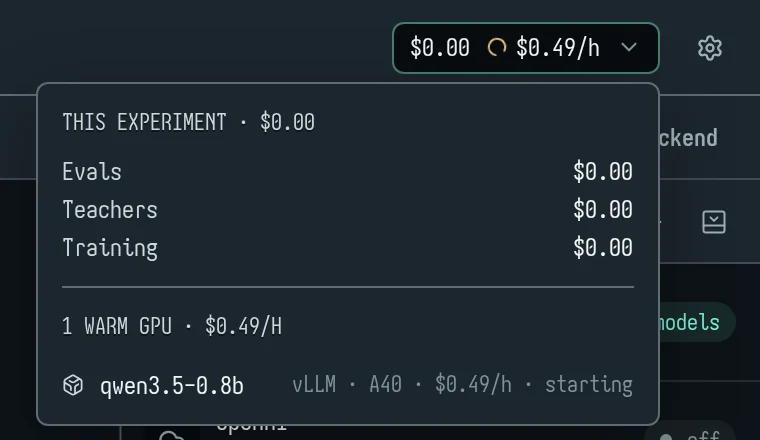
The button at the top right shows two things: what this experiment has cost, and what your warm GPUs are burning per hour. Your GPUs are the ones you hold warm, your runs call, or that carry your trained runs; someone else's warm-up on a shared node isn't counted.
- A flame and $0.00/h (green) mean nothing is warm.
- A turning ring means a GPU is starting.
Open it for:
- This experiment, split into Evals, Teachers and Training;
- evals by build, and each teacher batch;
- anything not priced, listed rather than guessed;
- the warm GPUs with their rates. Click one to open its card.
From a terminal, pm show (experiment_show) prints spent the same way.
How it's worked out
- Provider models: on your own keys, at the provider's price per million tokens (OpenRouter's public list, or the provider's own figure when it reports one) × the tokens each call used. Every call counts, retries included.
- pocket model GPUs: from your balance, by the token: one rate for input and output, by the model's size (pricing). Warm-ups and idle time cost nothing.
- Teachers: each batch's calls at the teacher's price.
- Training: the run's quote, charged when it starts, however long it takes. A run that fails is refunded; one you stop gets back the part of its planned training it didn't do.
A budget per experiment
experiment_budget usd: 25 (pm budget 25) sets the most an experiment may spend. It is kept on the experiment, and the server refuses a new eval run, training start, or model_ask of a provider's build whose estimate would take the experiment's spend past it: a 409 (code: "budget") with the budget, what is spent and the estimate. Nothing already running is stopped. Spent counts every call the experiment made (our models at our rate, your own keys at list price, the judge and teachers included) and its training runs as charged, less refunds. pm budget alone shows the budget, spent and left; pm budget off removes it. A dry run says when a run would be refused.
Estimates
Every estimate is worked out from your rows, with no call to anyone: tokens by each model family's characters per token, pictures at the size the model sees them, and seconds a call from the build's answers here or its measured speed.
| What | Estimate |
|---|---|
| Eval | Run's ~$ and ~time before you press it; eval_run dry_run=true / pm eval --dry-run: build by build its calls, tokens a call in and out, $ by who pays, seconds, and the judge's share. Afterwards eval_report and pm report put the estimate beside what the run came to (estimate_vs_actual). |
| Teacher batch | the Generate button's ≈$; dry_run; basis says what it's based on |
| Training | the plan's minutes and quote; train_status puts the quote beside the minutes trained |
Before a run sends anything, a key of yours that it will spend on is asked what it has left (OpenRouter), and the judge is checked once. If either can't cover the run, Run says so with Run anyway.
GPUs are cold until you run
- Opening an experiment, looking around or adding a build doesn't warm a pocket model GPU. Run (or Generate, for a GPU teacher) warms the GPUs that run needs. A snowflake on the button means you'll wait for a cold start.
- While you keep working after a run (pointer, keys, scrolling), those GPUs are held for another minute at a time.
- A training run near its end warms its base's node, so Evaluate answers fast.
- Hiding the tab lets go.
- An idle GPU stops about a minute after its last hold or request.
- To let one go now, press Stop on its card (section 10).
8. pm and MCP, for agents
Install
pm is the npm package pocketmodel (Node 20 or later); pm is a second name for the same command:
npm install -g pocketmodel
Then add it to your agent (below). It signs you in through the browser the first time.
Sign in
pm login
- pm opens your browser at an approval page showing a code like
BCDF-GHJK. - Check it matches the terminal and click Approve. pm is signed in as you.
The token:
- is stored in
~/.config/pocketmodel/credentials.json(mode 0600), one per server; - can do anything you can in pocket model until you revoke it in Settings → Agents;
- is stored on the server only as a hash.
pm logout forgets it locally. pm whoami says who pm acts as, and where.
Environment:
PM_URLpicks a server (defaulthttps://app.pocketmodel.ai).PM_TOKENsupplies a token (for CI).PM_EXPERIMENTpicks the experiment.
Use it
- Every command takes
--experiment <id or name>(-e), else the onepm usepicked. --jsonprints one JSON document on stdout.@filereads a value from a file,@-from stdin.- Exit codes: 0 ok, 1 error, 2 usage, 3 not signed in, 4 conflict (re-read and retry), 5 under
--fail-under. - Every error names the next step: "not signed in → run
pm login".
Add it to an agent
Install it first (above), then add pocketmodel mcp to the agent:
| Agent | How |
|---|---|
| Claude Code | claude mcp add pocketmodel -- pocketmodel mcp |
| Codex | codex mcp add pocketmodel -- pocketmodel mcp |
| Cursor | in ~/.cursor/mcp.json: { "mcpServers": { "pocketmodel": { "command": "pocketmodel", "args": ["mcp"] } } } |
| OpenCode | in opencode.json: { "mcp": { "pocketmodel": { "type": "local", "command": ["pocketmodel", "mcp"] } } } |
| Pi | pi mcp add pocketmodel -- pocketmodel mcp |
| OpenClaw | with the gateway stopped: openclaw mcp add pocketmodel --command pocketmodel --arg mcp |
It signs you in through the browser the first time.
It serves the same commands as 61 MCP tools, on your machine, so files are paths. It is signed in as pm login left it, and opens the sign-in itself the first time it is needed. When a newer pocketmodel is installed, the running server moves to it without dropping the connection. Its opening instructions give the usual order: experiment_create → rows_import → rows_split → prompt_set / grader_set → rules_set / data_check → models_list → build_add → eval_run → synth_run → review_accept → train_plan / train_start → train_status → train_eval → serve_info.
- Long work:
eval_run,synth_*andtrain_evalwait a bounded time (wait_s), then return an id to come back with.train_statusnever waits;train_waitis the one that waits for a run to end (up to 10 minutes a call). No call outlives a client's timeout. - Answers are kept small, at any scale: every answer stays under about 20 KB. Lists come a page at a time with a
nextsaying how to get the following one; long text is cut and marked with its full length (rows_get field=…gives one field whole, a piece at a time); an answer still over the budget is trimmed and says what was left out. - Ask the server, not the context:
rows_queryandresults_queryfilter (split, builds, pass, errored, set aside, awhereon any field), search the text, sort, pick fields, sample (seeded) and tabulate (agg: count, by_build, confusion, distinct) where the data is; across builds,by_rowranks the rows by how many builds fail them anddisagreementfinds the rows where their answers split.buildstakes groups (all,trained,base,provider) and globs (*lora*):results_query {"agg": "by_row", "builds": ["trained"], "sort": ["-fail"]}is the rows every trained build fails.exportwrites every matching row or answer to a CSV or JSONL file and returns only its path, count, columns and first three lines. - Pictures:
rows_getreturns a row's pictures as images, so the agent sees them. - Errors: they name the MCP tool to call next, not the pm command.
The full list is in section 12.
The runbook
This is how our end-to-end test runs went, and what they learned. An agent following it built a receipt extractor from an empty experiment to a trained, evaluated model in 35 minutes and about 30 tool calls.
- Restart the MCP server if pm was rebuilt (Claude Code:
/mcp).whoamishowspm_build; apm_updatedfield on any answer means reconnect. - Set up:
experiment_create, thenrows_importfor validation and test (absolute paths; photos upload themselves). Passexperimentexplicitly. - Grader first:
grader_setwith the task's metric. Useg.metricfor parts, and strip fences and<think>in the parser. Itsself_checkmust pass every row. - Label rules before any model call:
rules_set, thendata_check group=true. Look at flagged rows' photos (rows_get, orrows_export pictures_dir=). - Audit test with rules and photos only; use
suspecton validation. Reporteval_report labels=originalbeside the fixed-label score. - Fix or set aside:
rows_editwith areason;rows_mapfor bulk changes (dry_runfirst);rows_excludewith a reason;rows_distinctfor false leaks.
- Write the conventions you found into the prompt, then baseline every build on validation. Check
models_listforvision. - Pick the teacher after the prompt is final. Trial about 50 rows per candidate, and heed
cheaper. Alwaysdry_runfirst. - Label in batches. After each batch:
synth_status;rows_export only_new=true, thendata_check;- cross-check with a second model;
- edits first, rejects last (or uids);
review_accept clean=true.
- Watch
experiment_show'sspentafter each batch. train_planearly (with_new=true). For photo tasks checkpictures == rows. Use 3 epochs.train_start, thentrain_wait run="#n"until done (train_statusfor where it is meanwhile). Confirm the run'spictures.train_eval run="#n"on test, then validation. Readvs_base, and compare builds by key, not name.- Look for regressions in the data. In the photo run, 47 train rows listing zero-price modifiers as items taught the student the wrong convention. Setting them aside fixed it.
- Ship:
train_downloadorserve_info.
CI
PM_TOKEN=pm_… pm eval -e receipts --split test --wait --fail-under 85%
9. The assistant, and watching an agent work
The assistant panel
Every stage has an Assistant at the bottom right: a chat about this experiment, using the model you set in Settings → Assistant. It reads the live experiment on every turn, so it sees a run as it stands.
- On Evaluate it can:
- read rows, answers and results, and search rows;
- show you a build or row;
- pick rows for the next run;
- edit the system prompt, grader, label rules and rows. Edits are "like sed": a find and replace, with the changed lines shown.
- On Data it can:
- read and search the training rows, keep and drop them, and save a version;
- set up a teacher batch.
- On Train it can:
- compare runs and read the training set;
- set up the next run.
It never runs, generates or trains itself. It prepares, and you press Run, Generate or Train. Each tool call shows in the conversation; click one to see what came back.
The conversation is kept for the tab. The pencil starts a new one, and the panel folds to a strip on the right edge. Without a model set up, the header says Set up assistant.
The assistant also drives Adjust prompt…, Generate grader…, Generate rules… and the smart filter.
Agent-driven mode
When an agent works on an experiment through pm mcp, the app shows it live.
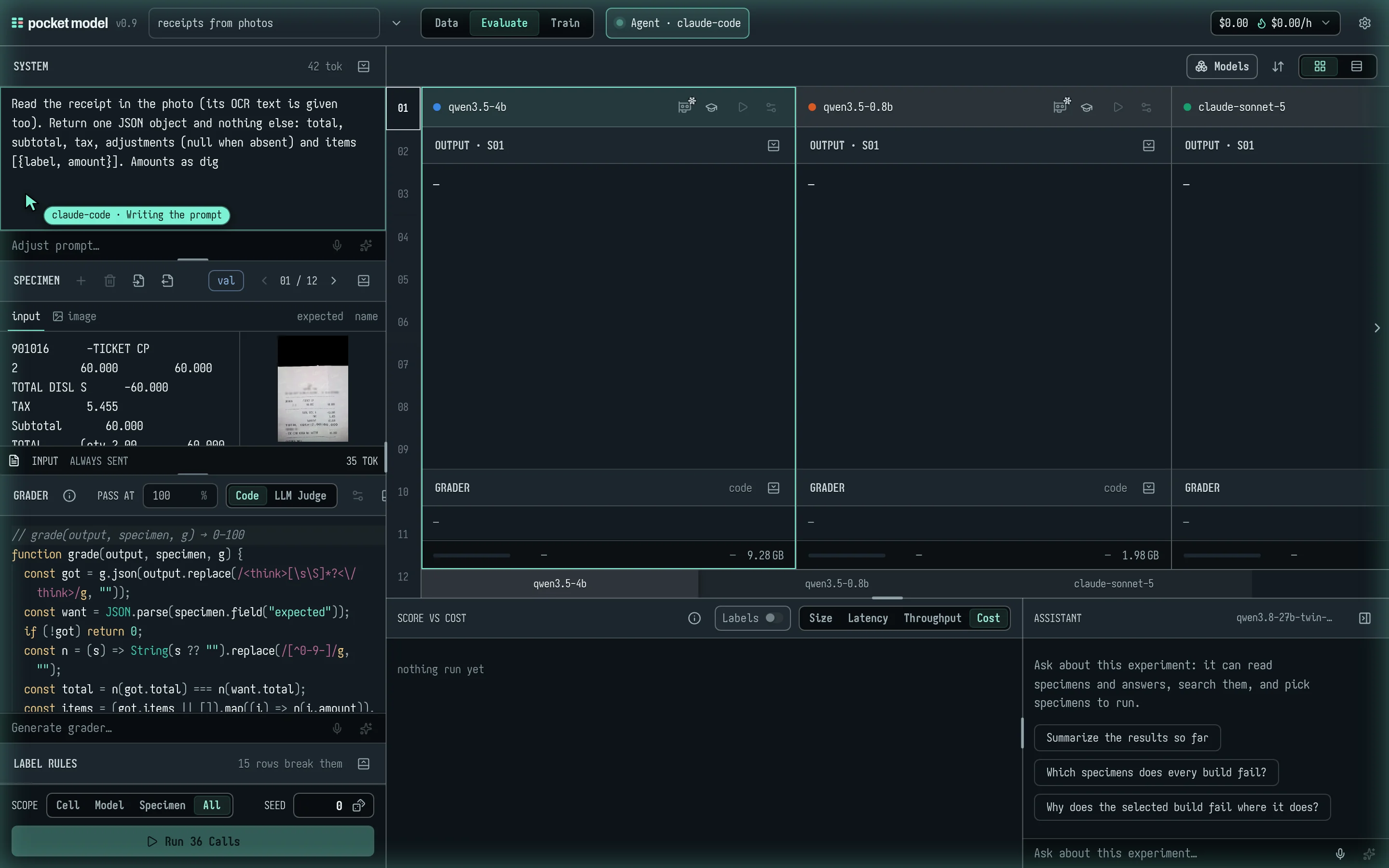
- The glow: a soft pulsing glow round the window while an agent drives.
- The badge: "Agent · claude-code" in the bar, with the tool it's running. It's named after the MCP client.
- The cursor: a cursor with the agent's name goes to the control each call uses, with a caption ("Writing the prompt", "Running every build"…). It types what the agent sets into the field, then the change lands.
- The cursor only shows; it clicks nothing.
- It skips ahead when you aren't following, the tab is hidden, or several calls are waiting.
- Read-only: the experiment is read-only while driven, so you and the agent can't overwrite each other.
- Still usable: changing stage, opening, duplicating or exporting, folding sections, sorting cards, the
{}format toggle, and the assistant (its edit tools are withheld).
- Still usable: changing stage, opening, duplicating or exporting, folding sections, sorting cards, the
- Follow agent: the view follows the agent's stage. Pick a stage yourself and following stops; Follow agent brings it back.
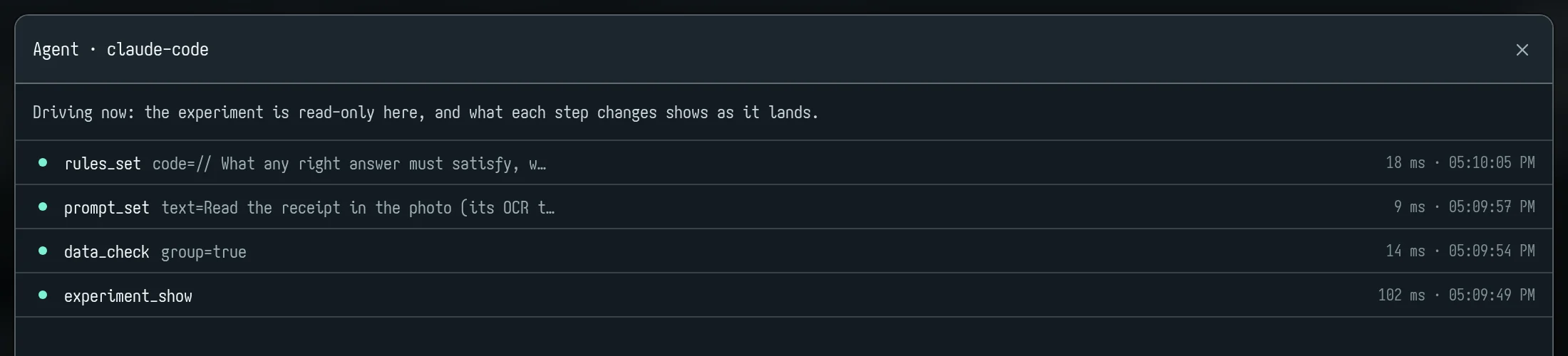
- The steps: click the badge for every call, newest first, each with what it asked and what it answered.
When it ends:
- The agent lets go when its MCP client disconnects, or about 2 minutes after its last call.
- The badge then reads "finished nm ago" for 30 minutes.

Only pm mcp reports steps. Plain pm commands from a script don't make the app read-only; revision checks keep the two from overwriting each other.
10. GPUs
pocket model's own GPUs (the pocket model GPU cards) are yours: one endpoint per model, and one per trained run on it, made the first time a run calls it. Nobody else can call yours, and your trained runs are visible only to you. You pay by the token; a GPU that is cold, starting or idle costs you nothing.
GPU cards and their states
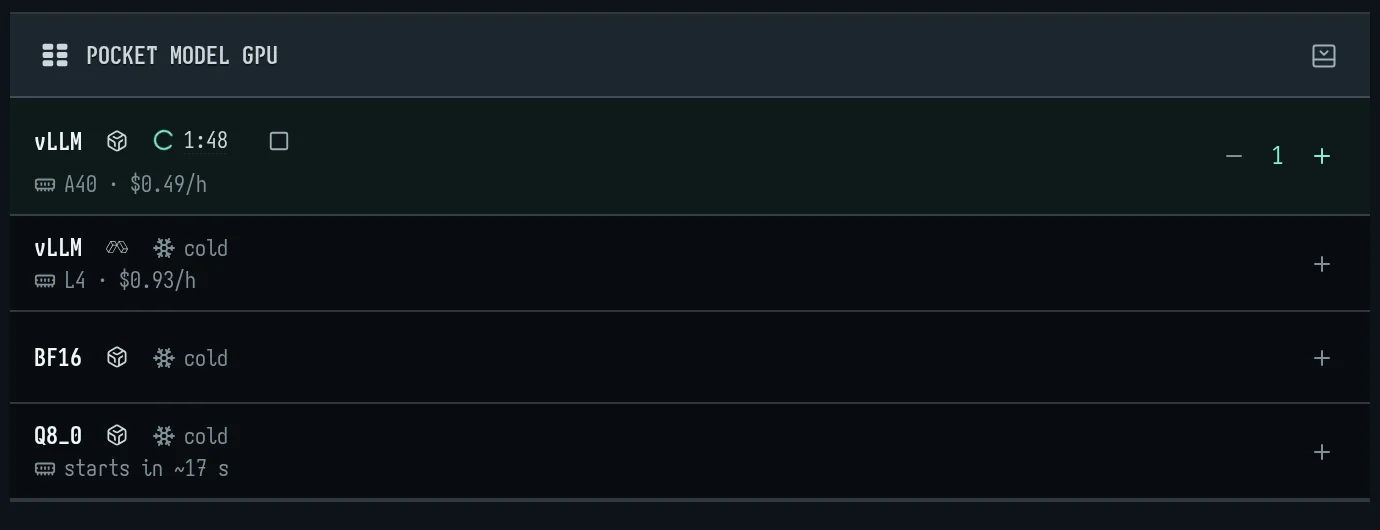
On a build's tags, and on the model's cards, a GPU mark shows:
| Mark | Meaning |
|---|---|
| green, with a dot | warm: answers at once |
| muted, with a snowflake | cold: the next call starts it |
| yellow, flashing | starting (a clock shows how long, and what's expected) |
| red | failed last time; Run tries again |
- Stop on a warm or starting card lets the GPU go. Its builds stay in the experiment, and the next run starts it again. It stops once nobody else holds it and it has had no request for a minute or two.
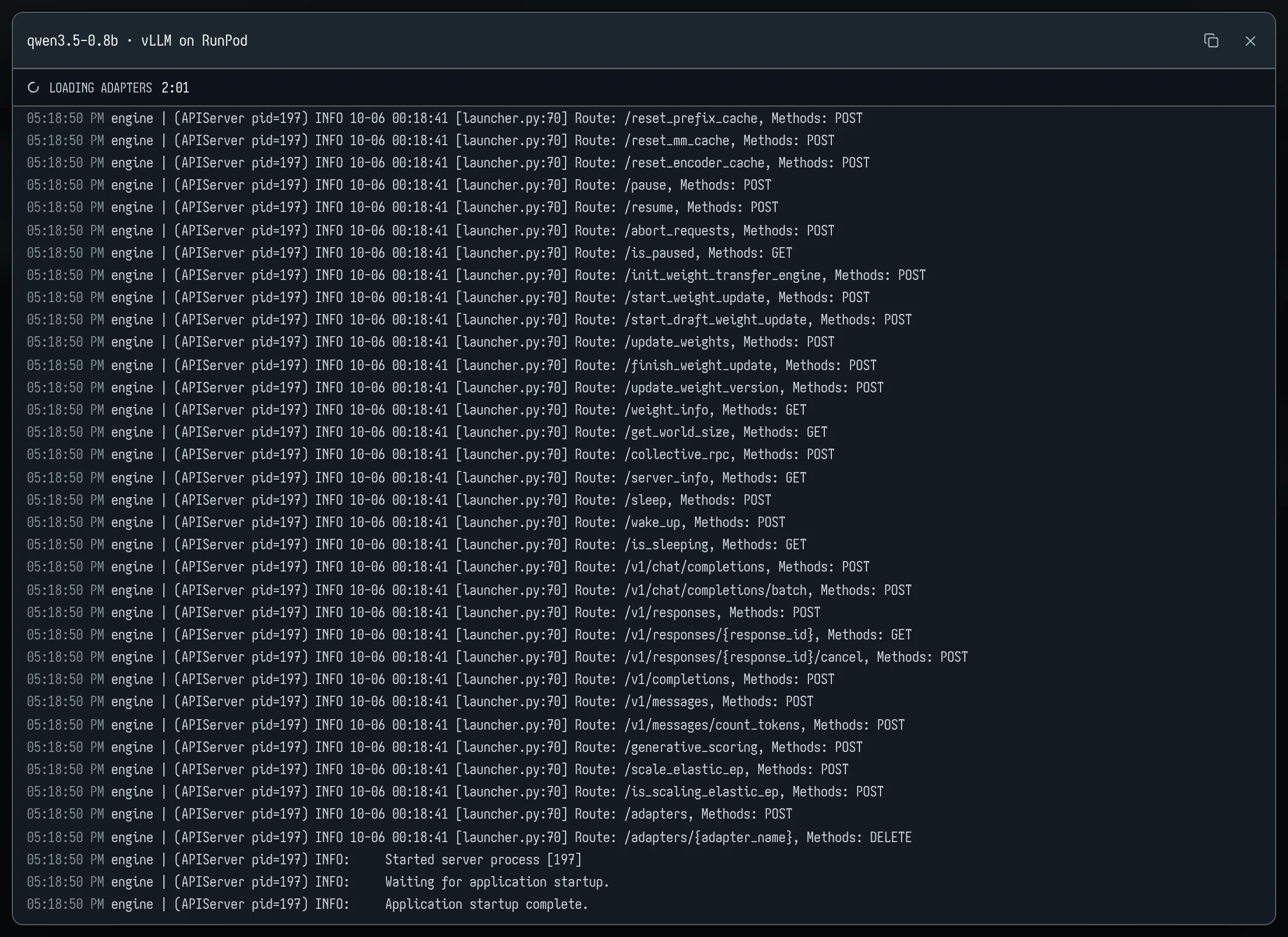
- Start log: click a starting, ready or failed state to watch it start. Lines stream every 2 seconds; Copy the log copies them.
11. Troubleshooting
| Symptom | Cause | What to do |
|---|---|---|
An agent's answers carry pm_updated, or a fix you shipped "didn't take" |
The MCP server is the old pm it was started from |
Reconnect it (Claude Code: /mcp). whoami shows pm_build. |
pm gets HTTP 426, "this pm is too old…" |
The server refuses training data from a pm that would leave out pictures | Update it: npm install -g pocketmodel. |
not signed in (exit 3) |
No token for this server | pm login, or set PM_TOKEN. |
keeps changing under pm (exit 4) |
The experiment changed while pm wrote it (the app or another agent) | Run it again, or close the experiment in the app. |
| Row ids moved after a reject or remove | S-numbers are positions | Use uids from rows_list; edits first, rejects last. |
| The page is read-only | An agent is driving, or did within the last 2 minutes | Wait for it to finish, or close its MCP client. |
| First answers very slow | Cold GPU (the snowflake on Run) | Expect up to a minute or so; the card's clock says what's expected. Latency figures leave the warm-up out. |
| Many "not JSON: wrapped in a ``` fence" fails | The model wraps JSON in a fence | Strip fences in the grader, or set response_format with build_set. |
| "it only reasoned and gave no answer" | Thinking used up the tokens | Raise max_tokens or turn thinking off (build_set). |
train_eval says the run isn't on the fleet yet |
The adapter registers about a minute after the run ends | Call it again shortly; it waits up to 5 minutes itself. |
Trained score far below after |
Served differently from how it was trained | Fixed: runs are now asked as trained. Check answer length (max_tokens). |
train_plan warns pictures would be left out |
GRPO trains on text only | Use SFT for photo tasks. |
| A teacher batch cost more than its estimate | Long answers or hidden thinking | Use dry_run and read basis; synth_status shows $ so far. |
| Smart filter or Generate… does nothing | No assistant set up | Settings → Assistant. |
| "HTTP 400: Input length exceeds…" on a photo | A very tall photo overflows a small model's context | Set that row aside. |
12. Reference
The MCP tools
The 65 tools, in the order pm mcp lists them (made from cli/mcp.ts by node scripts/tool-table.mjs --write):
| Tool | What it does |
|---|---|
whoami |
Who pocket model acts as, on which server, and their pocket model balance (balance: usd, available, blocked — below zero, new work on our models and training is refused). |
balance |
What the person has to spend at pocket model, and on what it went: balance, held (training runs' quotes held until they end), available, blocked (below zero: new work on our models and training is… |
promo_redeem |
Redeem a promo code the person gave you: its credit is added to their pocket model balance, once per account. |
experiments_list |
The person's experiments (id, name, rows, builds, kind: its recipe, else image, chat, json or flask), most recently saved first. search: those whose name, system prompt, recipe, builds, grader, field… |
recipes_list |
The recipes an experiment can start from (experiment_create recipe=): one shape of job each — classify (one label from a set, F1 on the labels that matter), extract (fields into JSON, field by… |
experiment_create |
Make an experiment (one task: rows, a system prompt, a grader, builds) and work on it. |
experiment_use |
Work on an existing experiment (by id or name) from now on. |
experiment_budget |
The experiment's budget: the most it may spend, in $, kept on the experiment. |
experiment_prevalence |
The positives' natural share in real traffic (fraud at 2% while the test rows hold 5%), kept on the experiment: eval_report's ranking then gives precision re-weighted to it by default… |
experiment_show |
An experiment at a glance: rows by split (each split's role, rows in use and set aside), builds, grader, prompt, link, and what it has cost so far (evals, teachers, training — a build since taken out… |
rows_import |
Add rows from a file on this machine, inline content or a URL (CSV with an input column; JSON array or JSONL records with input/prompt/messages and expected/output/completion). |
rows_preview |
Rows exactly as a model receives them: Evaluate's call (the system prompt, the turns — a conversation's as they happened, tool calls and results — and the tools offered) and the training row (the… |
rows_list |
A page of rows: id, uid, split, input and expected answer, cut to 160 characters (full=true: whole, within the ~20 KB an answer keeps to) — 50 a page; next says how to get the following page. |
rows_query |
Rows found on the server — a page of them, a count, or each value of a field with how many rows have it — without reading every row here. |
results_query |
Answers and their grades found on the server, a page or a table at a time, without reading every answer here. |
export |
Write every row, or every answer with its grade (a report's per-row results), that a query matches to a file — CSV or JSON lines, whole, nothing cut — and get back only where it is, how many lines,… |
rows_export |
Write rows to a local JSONL file, whole: id, uid, split, input, expected, every field, new or not — and back come the path, the count, the columns and the first three lines. |
rows_get |
One row, every field, with each build's answer to it, graded — and its pictures, shown to you as images (picture=false to skip). |
rows_edit |
Set a row's input or a field (default: expected). |
rows_map |
Change a field on many rows with one JavaScript function: map(value, specimen) returns the new value (an object becomes compact JSON; undefined or the same value leaves the row). |
rows_remove |
Delete rows (later rows are renumbered; answers follow them). |
rows_move |
Place rows in a split by hand (they stay there when the split is dealt again, unassigned ones too). |
rows_split |
Deal the rows: validation and test (counts, or percents like "20%"), the rest train. |
prompt_get |
The system prompt the models get. |
prompt_set |
Set the system prompt the models get. |
data_check |
What is wrong with the rows, before training or trusting a score: empty inputs, validation/test rows with no answer, train rows that leak held-out ones, duplicates, expected answers not JSON or… |
data_audit |
Labels the builds dispute, field by field (JSON answers): the cells where at least min_agree builds give the same value — strictly the most common among those that answered — and the label says… |
rows_exclude |
Set rows aside, with why: they stay in their split but are not scored, trained on or shown to a teacher until let back in (rows_include). |
rows_distinct |
Mark rows as checked and not copies of any held-out row, however alike their inputs read (receipts from one shop share a header): data_check's leak check leaves them alone. undo=true clears the mark. |
rows_include |
Let rows set aside back in (all of them if none named). |
rules_set |
Label rules (specimen.text is the input, specimen.field(name) a field, specimen.split its split): JavaScript check(answer, specimen, g) recording what any right answer must satisfy whatever its… |
grader_get |
The grader: code grade(output, specimen, g) → 0–100, and the pass mark. |
grader_set |
Set the grader's JavaScript (function grade(output, specimen, g) returning 0–100; g.json (strict: a fenced or prose-wrapped answer is "not JSON"; g.json(output, {lenient: true}) takes the JSON out of… |
judge_check |
How far to trust the LLM judge: it grades the rows' own expected answers (the labels) as if a model had given them — a judge that fails right labels is miscalibrated (its prompt, model or the pass… |
models_list |
What can run and train, and which take pictures (vision): students (trainable bases for train_start); pocket models (pocket: build ids like qwen3.5-4b@bullet; trained runs apart, each with the… |
teachers_list |
The teachers the person can use, for synth (and teacher-row judges), and what each can do — to choose one yourself. |
experiment_activity |
What happened to the experiment and who did it, newest first: rows moved between splits, held-out sets, prompt/grader/label-rule edits, builds, eval runs, teacher batches, training runs — by the app,… |
build_set |
A build's call settings: its own system prompt (prompt), thinking (off for a model that should answer straight away), its output limit (max_tokens: the most it writes in one answer, thinking… |
build_add |
Add models to the experiment as builds: a pocket model id, or |
build_list |
The experiment's builds. |
build_remove |
Take a build out, with its answers. |
build_import |
Add a build whose answers come from a file — a local model's per row (LightGBM's level or label, rules run as code), and optionally its score (a probability: what the rows rank by, in place of what… |
eval_run |
Run builds over rows on the server, then grade: per build pass rate, mean score, errors, speed, and failing rows. |
eval_stop |
Stop an eval run (or every unfinished call in the experiment): the answers already in are kept and graded; the rest are not asked. |
eval_export |
Write every graded answer to a local JSONL file, a line per row and build: row, uid (the row's own id: it survives edits, rows_map, removed rows and experiment copies — join on it), split, build,… |
eval_report |
The graded results as they stand: per build pass rate (over the rows answered and graded) and mean score, each with its 95% interval (pass_rate_95, mean_score_95: how far the score could move on… |
synth_rollout |
A teacher plays the agent in the played rows in train or in no part yet (scenarios: rows_import play; never a held-out one) to their end, the experiment's simulator answering its tool calls and its… |
synth_label |
A teacher answers real inputs you have (a file's records — path, content or url — their answers ignored; their pictures, as rows_import reads them, sent too), never one that nearly copies a… |
synth_run |
A teacher writes n new rows (never copying test/validation ones), in one of two modes (default: the one the Data page is set to). synthesize: whole rows, per_call to a call — the input, its… |
synth_status |
A teacher's batch (synth_label / synth_run): kept, dropped and why, unjudged (kept though its judge could not grade them, and why), tokens and $ so far, finished or not; waits up to wait_s for it to… |
review_list |
The teacher's new rows, waiting to be accepted: how many, and a page of them (20, texts cut to 200 characters); next says how to get the following page. |
review_accept |
Accept new rows (all, or by id): from now on they train and the teacher sees them. clean: only the ones data_check finds nothing wrong with (their answers keep the label rules), the rest left for… |
review_reject |
Reject new rows (all, or by id): deleted. |
train_plan |
What a LoRA run on the train rows would take and cost, and the settings it trains with (SFT: loss on the answer's tokens only). |
train_start |
Start a LoRA run on the train rows. |
train_status |
Training runs and where they are, at once (never waits: train_wait waits for a run to end): state (and what it is doing before its first step), step (step_at: when it was logged, by the trainer's… |
train_wait |
Wait for a training run to end: holds the call until it finishes, fails or is stopped, or timeout_s passes (default 300, at most 600), saying its step as it goes; then its full status, as… |
train_export |
Merge a finished run's LoRA into its base as one model, for devices or runtimes without adapter support: HF safetensors and/or GGUF (bf16, q8_0, q4_k_m). |
train_download |
Save a finished run's trained files on this machine: the PEFT LoRA adapter (safetensors + config: vLLM, transformers/peft) and the merged model. format=merged merges it if not done yet (CPU, $0) and… |
train_playground |
A finished run of a small base (≤ 1.5B) on a public, unlisted page that runs it in the visitor's browser (free, nothing per message): its Q4_K_M copied to public storage under an unguessable link. |
train_stop |
Stop a training run. |
train_checkpoints |
A run's kept steps: each validated step with its validation metrics (val_loss, val_score, val_f1, val_pr_auc, val_pass, val_reward — those it measured), listed as it validates, available once the… |
train_eval |
Add a finished run's model as a build and evaluate it here (default: the test rows, which no training run ever sees): its full result, the rows it gained and lost against the model it was trained… |
model_ask |
Ask a trained run, a pocket model, or any build of the experiment (a provider's model too) a few inputs of your own and get its answers — the way to try a model from here, without code: each input… |
serve_info |
How to call a trained run (or a pocket model) from code: an OpenAI-compatible base URL, the token to call it with, what a call costs (its size's token rate, from the balance), whether it is warm… |
pm commands
pm login [--url URL] [--no-browser] · pm logout · pm whoami
pm ls · pm new <name> [--system <text|@file>] · pm use <id|name> · pm show · pm rm <id|name> --yes
pm rows import <file> [--split S] · rows ls [--split S] [--limit N] · rows show <row>
pm rows edit <row> --value <v> [--field expected|input|<name>] [--reason <why>] · rows rm <rows…> · rows move <rows…> --to S
pm rows split [--val N|N%] [--test N|N%] [--all]
pm rows exclude <rows…>|--kind K --reason R · rows include [rows…] · rows distinct <rows…> [--undo]
pm prompt [set <text|@file>] · pm grader [set <code|@file>] [--threshold N] · pm rules [set <code|@file>]
pm check [--kind leak,rule,…] [--group] · pm audit [--field F] [--split S] [--build a,b] [--min-agree N] [--limit N]
pm models · pm build add <model>… · pm build ls · pm build rm <key>
pm eval [rows…] [--split S|all] [--build a,b] [--wait] [--fresh] [--dry-run] · eval --follow <run> · eval --stop
pm report [--split S] [--build a,b] [--fail-under 85%]
pm synth -n N --teacher <build|backend/model> [--samples K] [--prompt @f] [--mode synthesize|distill] [--dry-run] [--wait]
pm synth --inputs <file> --teacher <…> [--samples K] [--dry-run] [--wait] · synth --follow <run>
pm review [ls] · review accept|reject <rows…>|--all
pm train plan --student M [--method sft|grpo] [--epochs N] [--rank N] [--lr X] [--reasoning]
pm train start --student M … [--steps N] [--group N] [--from run] [--wait] · train ls · train watch [run] · train stop [run]
pm train eval [run] [--split test] · train export [run] [--format hf,gguf-q4_k_m,…] [--dry-run] [--wait]
pm train download [run] [--format peft|gguf|merged|all] [--out dir]
pm serve [run] · pm chat <run|gpu model> "message" · pm mcp
A row can be named S03, 3, a range like S01-S05, or a uid. A run can be latest, #n or a job id. S is val, test, train or none.